Sony's on a roll with their 2012 Ivy Bridge notebooks. The Vaio S series has always been a class leader among a small group of powerful ultraportables with dedicated graphics.
In fact, it harkens back to the older Vaio Z and SZ lines that put a premium on both portability and upgradability. Now the S Series has split into two lines: the Vaio S 13.3 and the Vaio S 15.5. The 15.5" model is new and replaces the Vaio F Series. The S 13.3" carries on the sub- 4 pound powerhouse tradition, and in this review we look at the Sony Vaio S 13.3 Premium, otherwise known as model SVS13A190X, or simply Vaio S13A. The S13A is close to the size and weight of Sony's first Ultrabook, the Vaio T! The S is priced similarly to the T, making the S a better deal overall.
The premium model starts at $1,119 and you get plenty for your money:
- Full mobile Intel Core i5 and i7 CPUs (dual core, third gen)
- Switchable graphics with Intel HD 4000 graphics and 1GB DDR3 Nvidia GT640M LE (Kepler) dedicated graphics
- 1600 x 900 matte display
- Carbon fiber casing (available in black, gold and gunmetal)
- Internal DVD burner (Blu-ray is optional)
- Fingerprint scanner with TPM
- 7200 RPM hard drive (SSD is optional)
- 4 to 12 gigs of DDR3 1333MHz RAM
- Backlit keyboard
- 2 USB 3.0 ports, 1 USB 2.0 port, HDMI, VGA, Gigabit Ethernet and 3.5mm audio
- Intel WiFi 802.11n with Intel WiDi and Bluetooth 4.0 + HS
Other Vaio S 13" Models
The standard Vaio S13 weighs 3.8 pounds and is 0.95" thick. The premium, thanks to carbon fiber, weighs 3.69 pounds and is 0.90". The standard model starts at $799 with integrated graphics and the $999 enhanced model has switchable dedicated graphics. Both standard and enhanced have 1366 x 768 displays. Our premium rocks a good quality 1600 x 900 matte display with decent blacks and above average color saturation. It's not as good as the superb 1920 x 1080 panel used on the
Sony Vaio Z, but that machine costs a good deal more.
In this review we cover the $1,199 premium model with 6 gigs of RAM and a 640 gig 7200 RPM hard drive. The laptop has a 4,400 mAh Lithium Ion battery and there's an optional sheet battery that doubles runtimes. If you remove the notebook's bottom cover (affixed with two small Phillips head screws) you can access the battery, single RAM slot and hard drive. The notebook has 4 gigs of RAM soldered on the motherboard and one standard SODIMM RAM slot (ours shipped with a 2 gig module but I upgraded it to an 8 gig module for a total of 12 gigs).
Is the Vaio S13A just a poor man's Vaio Z? For some it might be, but I see it as a more all-around machine for those who need an optical drive and internal dedicated graphics and can live with 3.7 vs. 2.5 pounds on the road.
Carbon fiber goodness: the Sony Vaio Z and Sony Vaio S 13.3 Premium.
Sony Vaio S 13.3 Gaming Demo
In the video below we test Skyrim, Diablo III, May Payne 3 and Civ V on the Sony Vaio S 13.3 Premium with the Nvidia GT640M LE. We tested all the games at native 1600 x 900 resolution, and often used fairly aggressive quality settings (we show you the settings used for each game in the video). Results were suprisingly good with very playable frame rates (shown on screen courtesy of FRAPS). The Vaio has the 2.5GHz Core i5 and it's clearly good enough to play today's demanding 3D games.
Design and Ergonomics
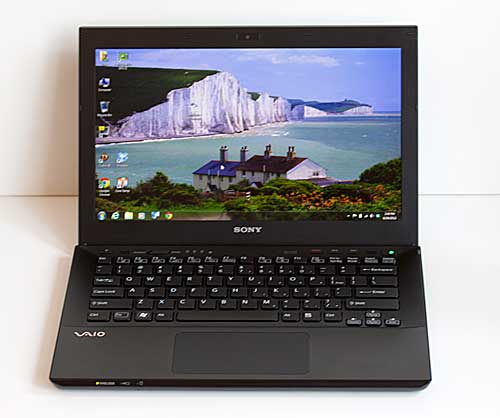
The Vaio S, Vaio T and Vaio Z use Sony's "full flat" design. That's not a very compelling moniker from a marketing perspective, but it does aptly describe the thin and flat chassis design. There's no Apple taper and Sony goes with an angular look rather than gentle curves. The Vaio S is attractive and looks like a quality piece. The mirrored angular hinge is a unique design touch with practical applications: it blocks the rear vents less than standard lid designs and allows for a cleaner appearance from the sides. The angled edges look cool and make the notebook easier to grip. The usual large Vaio logo graces the lid in silver on standard models and it's gold on the premium model.
The premium model has a carbon fiber casing like the Vaio Z and other high end Sony notebooks of the past. Carbon fiber isn't just designer frou frou: it's lighter, thinner and strong. That's how Sony achieves the thickness and weight reduction, and it looks good too. The standard Vaio S 13.3 has a magnesium alloy casing that's also strong but in terms of aesthetics, it somehow looks and feels like plastic (likely because the painted alloy is so thin and light). I prefer the carbon fiber look, but functionally, both the magnesium and carbon fiber models are good stuff. The display panel exhibits Sony's usual flex, which they say is intentional so the display bends without snapping. I've been using Sony notebooks for years with these thin and flexible display panels and have never had a problem with them.
All ports are on the right, so there's no need to hunt for that USB or HDMI port. The notebook (regardless of variant) has 2 USB 3.0 ports, 1 USB 2.0 port, HDMI, gigabit Ethernet, VGA and a 3.5mm audio jack. That's a good set of ports for a machine this small, and the only thing we long for is a DisplayPort to drive very large, high resolution displays that exceed the HDMI port's 1920 x 1200 max resolution. The Vaio S has both SD and Memory Stick Duo slots as well.
Display and Sound
The 1600 x 900 matte display is head and shoulders above today's gloss displays for clarity thanks to the lack of reflections. It has rich colors despite the matte finish and slightly better than average color gamut (compared to the notebook average). Why is a matte display a premium feature on notebooks? Because manufacturers can use cheaper, less capable panels that rely on the gloss finish to increase apparent contrast, black levels and color depth.
Viewing angles are again a bit better than most notebooks with TN panels, and that means the sweet spot for best viewing isn't as hard to find compared to other laptops with TN panels (most notebooks use TN panels, inlcuding Vaio S 13.3 models). Viewing angles aren't nearly as good as IPS displays by any means. Is the premium display as good as the Sony Vaio Z's 1920 x 1080 display? No. You do get what you pay for. The Z has an unusually wide color gamut, and colors and highlights really pop compared to the S premium. In terms of sharpness, the Vaio S13A has high pixel density so text and images look very sharp. The Vaio S 13.3 premium has a good display, but we'd love to see an even better one to compete with Apple's non-Retina notebooks and the Asus Zenbook Prime UX31A Ultrabook. After all, it is a premium notebook.
The machine has Intel WiDi wireless display courtesy of Intel HD 4000 graphics and the Intel Advanced-N 6235 single band WiFi card. That means you can output a movie and anything else you wish to your TV wirelessly if you have a WiDi wireless receiver like the Netgear Push2TV attached to your home theater system via HDMI.
Sony's stereo speakers are by no means impressive. It never ceases to amaze us that a company that's known for excellent consumer and pro audio gear can ship such tinny notebook speakers. Despite help from both Dolby Mobile Home Theater v4 software and Sony's own xLoud/Clear Phase audio enhancements, the speakers aren't very loud and they have no bass. You can choose between Sony and Dolby audio, and Dolby is much louder and a bit more full. Connect headphones or stereo speakers and you'll hear a world of difference: lush sound with good bass and plenty of volume. The audio circuitry and software are good stuff; it's the speakers that hold the system back.
Keyboard and Trackpad
We're quite fond of Sony's roomy chiclet keyboards: they have plenty of key spacing and the keys are relatively large. The Vaio S has good key travel (much more than the 0.66" thin Vaio Z or the Vaio T Ultrabook) and good tactile feel. The keyboard doesn't offer the Lenovo ThinkPad's dreamy tactile feedback, but somehow I type just as fast on the Sony as on the Lenovo ThinkPad X230 12.5" notebook. The premium model has a white backlit keyboard and the light shines out from the keys' edges. When plugged in, the backlight stays on all the time in dim environments. When unplugged, the backlight turns on when you press a key, and it turns off after a short period to save power (you can set the interval but it's fairly conservative).
The Vaio has Sony's usual dedicated shortcut keys above the keyboard for Vaio Care, web browser and the application of your choice. There's a dedicated CD eject button at the upper left corner, and caps lock indicators to the right. The charging, wireless and HDD LEDs live on the front edge. The power button is at the right corner and it illuminates in green when the machine is turned on.
The Synaptics buttonless touchpad is huge for a 13" notebook. It supports multi-touch gestures and it's more reliable than most other brands of Windows notebooks. The surface is ever so slightly rougher than the keyboard deck so you can tell if you've wandered off the trackpad. Though it lacks buttons, it clicks when you press the trackpad, and you can use the usual left and right click functions.
Horsepower and Performance
Here's the thing: Ultrabooks are all the rage right now, and there's a lot to like about them: they're super light, slim, have quality casings and reasonable processing power. But Sony was in the business of making ultraportable computers long before the netbook and Ultrabook crazes hit the market. They make machines with standard laptop computer processing power that fit in a near-Ultrabook size case. And the Vaio S (standard or premium) offers full mobile third generation Intel Core i5 and i7 dual core CPUs that run circles around the ULV (ultra low voltage) CPUs used in Ultrabooks. Do you need all that processing power? If you just use MS Office, email, web, occasionally edit photos, play music and watch video then you don't. But if you often use heavyweight apps like Adobe Creative Suite, edit 1080p video frequently and play today's demanding 3D games then you do need a full mobile CPU and likely a dedicated GPU for 3D gaming.
The base Sony Vaio 13.3 ships with 5400 RPM drives and the premium model ships with 7200 RPM hard drives. If you built to order on Sony's website, you can get SSD drives in 128, 256 and 512 gig capacities.
These are the same RAID 0 drives used in the Sony Vaio Z, but they use a standard SATA II/III connector. Since you can easily access the hard drive bay, that means you can upgrade to an SSD drive later to save money if you wish. Sony achieves extremely high data transfer speeds with their RAID 0 SSDs though, that surpass even the fastest aftermarket SSD drives like the Samsung PM830. SSD drives improve speed immensely when launching apps and booting Windows, though the Vaio S with a conventional HDD boots faster than average and wakes from sleep in just 2 seconds thanks to Rapid Wake technology.
The notebook has 4 gigs of DDR3 RAM soldered to the motherboard and one standard SODIMM RAM slot that accepts modules up to 8 gigs (the largest currently available in notebook SODIMM size). The machine uses 1.35 and 1.5v 1333MHz RAM. I installed a 1.5v 8 gig Corsair ValueSelect DIMM and it works perfectly.
Benchmarks
Synthetic benchmarks like PCMark Vantage give lots of points to fast SSD drives, and that's why the Vaio S 13.3 (and other powerful and larger notebooks) score lower on synthetic benchmarks than slower Ultrabooks with SSD drives.
3D Mark Vantage: 5611 (GPU 5032, CPU 8565) on Performance test preset
PCMark Vantage: 7575
Memories: 5014
TV and Movies: 3625
Gaming: 5957
Music: 6594
Communications: 9633
Productivity: 6321
HDD: 4219
Windows Experience Index:
Processor: 7.1
RAM: 7.4
Graphics (for Aero): 5.9
Gaming Graphics: 6.8
HDD: 5.9
Benchmark Comparison Table
| | | Sony Vaio S 13.3 Core i5, NVidia GT640M LE | Sony Vaio Z 2012 Core i7 | Lenovo ThinkPad X230 Core i5 | Sony Vaio T Core i7 ULV Ultrabook | MacBook Pro with RetinaCore i5, NVidia GT650M |
| PCMark Vantage | 7575 | 17,003 | 8152 | 12,120 | 19,174 |
| 3DMark Vantage | 5611 | 4,003 | 3209 | 3,078 | 10,656 |
Intel HD 4000 Graphics and NVidia GT640M LE Dedicated Graphics
All but the base $799 Vaio S13.3 offer switchable graphics with the new Intel HD 4000 integrated graphics processor and NVidia GeForce GT640M LE graphics with 1 gig of DDR3 VRAM. The HD 4000 is by far Intel's most capable integrated graphics chipset yet, and the NVidia GPU is built on a 28nm architecture with 3 to 4x the performance per watt of the outgoing 40nm Fermi architecture.
Dedicated graphics are extremely scarce in 13.3" Ultrabooks and they allow for things like faster video editing, faster Photoshop work and 3D gaming at solid frame rates. Our Vaio S13A with the base 2.5GHz Intel Core i5- 3210M with Turbo Boost to 3.1 GHz running on dedicated graphics had no trouble playing Diablo III, Skyrim and Max Payne 3 at native 1600 x 900 resolution with quality set to medium. Diablo 3 played at 45-70 fps depending on the screen, and Max Payne 3 (medium settings) ranged from 45 to 60 fps.
That's very impressive gaming performance that we'd expect to see on a 15"+ laptop rather than a lightweight 13.3" model with an upper mid-range mobile GPU. Nice. The 2.9GHz dual core i7-3520M would boost frame rates a bit, but we found it wasn't necessary with today's demanding 3D titles. Sony currently does not offer a quad core i7 option on the S 13.3.
Sony has employed a hardware "Speed/Stamina" switch for graphics switching for years and we love it. It's much more reliable than software switching used by AMD for Radeon graphics cards and even NVidia Optimus switching. There's no need to reboot when switching modes and it's extremely quick. One thing to note: even when on the Speed setting, the notebook will sometimes drop down to Intel HD 4000 graphics when the machine is set to the default Balanced setting in Sony power management. This is particularly annoying when you're in the middle of a battle in a game! Use the Vaio Control Center to set the fan to "Priority to ventilation" for the Speed setting and the problem goes away. Happily, the fan doesn't get much more aggressive on the Priority to ventilation setting.
Heat and Fan Noise
When fast components are jammed into a small chassis, heat can be an issue, but NVidia's new 28nm Kepler architecture generates noticeably less heat. The same is true of Intel's third generation 22nm Ivy Bridge CPUs: they run a bit faster and are cooler chips. Surprisingly, we noted that the Intel HD 4000 GPU doesn't run cooler than the chilly GT640M LE. Unlike aluminum, carbon fiber and even magnesium alloy don't transfer heat as directly to your skin, so the laptop never feels unbearably hot, even when gaming. Our machine's bottom stayed at a tolerable 93-99F except at the rear exhaust vent that reached 103F when playing games like Max Payne 3. The keyboard area doesn't get hot, and the far right wrist rest area gets warm (the hard drive is under there).
Fan noise is greatly improved in both the Vaio S and Vaio Z. Fan noise is even and not whining or grating. It's fairly quiet when doing productivity tasks. When playing 3D games (with either integrated or dedicated GPU) and exporting 1080p video, the fan cycles on and off and is certainly audible but it doesn't roar. When we set Sony's power management to priority cooling under speed (dedicated graphics) mode, the fan stays on more of the time but still doesn't get crazy loud. In fact, it's often a little quieter since it keeps the machine running cooler.
Software
The Vaio S 13.3 is available with
Windows 7 Home for the base price and you can get Windows 7 Professional for an additional charge. We particularly like the Sony premium video and sound editing titles included. You get the usual Office 2010 Starter Edition, a 30 day trial of Kaspersky Anti-Virus 2012, webcam software (including software that does PlayStation Move-like motion control for a few apps), Cyberlink Power DVD, Sony Vegas Platinum 11 (capable video editing software) and Sound Forge Audio Studio. There's a utility that lets you use the Vaio's keyboard with your PS3 and the less useful but large Play Memories Home. And there's Sony's redundant VaioGate app launcher that runs across the top of your desktop (fortunately it's easy to kill).
Battery Life
The machine has a 4,400 mAh Lithium Ion battery that lives under the bottom door. This isn't a quick swap battery that you release with a latch; rather you have to remove two screws that secure the door to access the battery. Sony sells an optional $150 4,400 Lithium Ion polymer sheet battery that attaches to the notebook's base to double runtimes.
Sony claims 7 hour runtimes, and that's obviously using integrated graphics with the display set at 50% or less. In our real world productivity tests with the brightness set to an adequate 40% and both WiFi and Bluetooth on, we averaged 6.3 hours on a charge. When playing video, the machine averaged 5.9 hours. Expect dedicated graphics to drop those runtimes by 1.5 hours or more. That's pretty darned good given the size and power of this notebook, but it's not one of the longest lasting notebooks on the market.
Conclusion
If you're looking for that narrow intersection of performance and portability, the Sony Vaio S 13.3 is hard to beat. You get the creature comforts of a big notebook (optical drive, dedicated graphics, full mobile CPUs) in a not much heavier or thicker than Ultrabook package. This laptop can do the jobs of both a capable 15" notebook and an Ultrabook. The 1600 x 900 matte display is a pleasure for long work sessions and photo editing thanks to the matte finish, and the excellent backlit keyboard is perfect for those who type lots.
The Vaio S is extremely stylish with excellent build quality and it will likely be appealing to those of you who find the also powerful 12.5" Lenovo ThinkPad X230 too thick or dull. It also beats the X230 on resolution, though not on display quality (Lenovo's IPS display is sweet). And for you style/quality mavens who are also considering the 13" MacBook Pro, keep in mind that the Sony offers a higher resolution matte display and dedicated graphics, which the 13" Mac lacks.
Price: $1,199 as tested. Standard starts at $799, Enhanced at $999 and Premium at $1,119