Headlines News :
Tampilkan postingan dengan label GADGET. Tampilkan semua postingan

Asus Transformer Pad Infinity TF700

There's nothing like anticipation and low inventory to hype a product. We saw that with the Asus Eee Pad Transformer Prime early this year, and now its successor, the Asus Transformer Pad Infinity TF700 is poised to start another feeding frenzy. While the Prime has its problems, the Infinity TF700 is everything the Prime should have been, and then some. 

Wireless radios work perfectly, ports and controls are more robust and the 1920 x 1200 HD display is one of the best we've seen on a mobile product. The rear f/2.2 camera with BSI sensor and 5 element lens likewise is the best tablet camera on the market. Granted, that might not say much given the state of tablet cameras, but the TF700 really does take excellent photos and 1080p video that far surpass the mediocre Transformer Prime and Asus Transformer Pad TF300 camera.
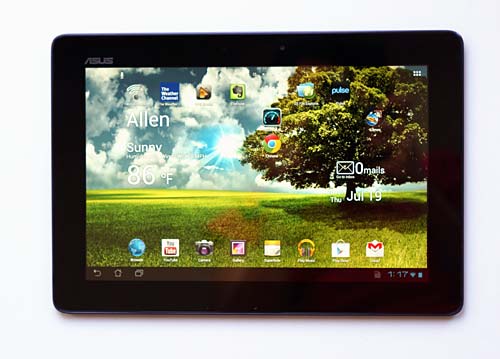


Asus Transformer Pad Infinity TF700
Specs

The tablet runs on the newer and faster 1.6GHz NVidia Tegra 3 T33 quad core CPU with 1 gig DDR3 RAM and 32 or 64 gigs of storage. It feels fast and is fast running Android OS 4.0 Ice Cream Sandwich, and we can't wait to see how much snappier it gets with Android 4.4.1 Jelly Bean and its touch of Project Butter (Asus has said the TF700 will get Jelly Bean, and knowing them, it will be sooner rather than later). 

The tablet has Wifi 802.11b/g/n, Bluetooth 3.0 and a GPS (that works). It has a front 2 megapixel video chat camera and a rear 8 megapixel camera. Ports include micro HDMI, the usual Asus proprietary charging/docking/USB port, USB host via the optional keyboard dock or Asus USB host adapter and a 3.5mm audio jack. The Infinity has a full HD Super IPS + capacitive display and a 25Wh Lithium Ion battery. The 32 gig sells for $499 and the 64 sells for $599. It's available in amethyst gray and champagne silver, similar to the Transformer Prime.

Display

Like the new iPad with Retina display, colors are lush and detail is extreme. Images look much more real and text is superbly sharp. Unlike the iPad, the Asus Transformer Pad TF700 has one of the brightest mobile displays available. The Super IPS + display reaches over 600 nits of brightness. That certainly helps outdoor viewability, though the glossy Gorilla Glass 2 clad front reflects plenty in sunlight. 

Is the display night and day different from tablets like the Transformer Prime? Not at first glance. But you'll notice the Infinity TF700 looks more appealing and sharper, yet not as harsh as the Prime whose contrast and coolness amplify sharpness while making things look a bit hard compared to the Infinity. If you own a Prime and are happy with it, there's likely no reason to upgrade. But if this is your first tablet or you're upgrading from an older 1280 x 800 Android tablet with a non-IPS display, you'll definitely notice the improvement. The Infinity's display is sharper and brighter than the HD panel on the Acer Iconia Tab A700.

Design and Ergonomics

The Infinity TF700 has an aluminum back with a swirl pattern and it's available in amethyst gray and champagne gold colors. It's one of the more attractive tablets on the market, and it's also very thin at 0.39" and light at 1.32 pounds. There's a plastic strip along the back upper edge to improve wireless reception (metal interferes with reception). We've enjoyed good WiFi performance and a tenacious GPS that locks onto satellites indoors even with WiFi off.
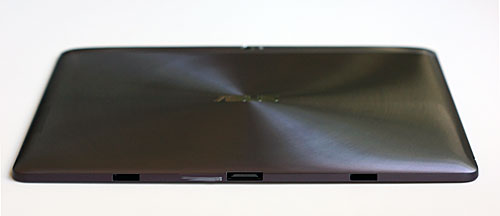
Asus Transformer Pad Infinity TF700

As with all Transformers, you can get an optional keyboard dock that turns the tablet into a clamshell notebook style. The dock has a keyboard, trackpad, USB port and an additional battery. Asus states that the TF700 and TF201 Prime docks aren't interchangeable, but we've no problems using our Prime TF201 dock with the Infinity. The new dock has a "TF700-dock" part number on the box, but the dock is labeled TF201-dock. Go figure.

We had complaints with the Prime's port and control design. In order to make the skinny tablet seem even slimmer, Asus used an aggressive taper that's more gentle on the Infinity TF700, and the same is true of the Transformer Pad TF300.

 That makes it easier to operate the buttons without your finger sliding down the taper, and ports can be a bit more robust. The dock connector is a bit sturdier though still delicate enough that it ships with a rubber plug protecting it, and the headphone jack still leaves some of the headphone plug exposed (be careful not to short it with anything metal or you might hear feedback in your ears when using headphones). 

Unlike the Prime, the TF300 and TF700 don't ship with rubber plugs in the two holes on the bottom edge for the optional dock's latches. The holes aren't pretty but apparently users didn't take the rubber plugs out of the Prime and thus couldn't get it into the dock (really?!).
Asus Transformer Pad Infinity TF700
With the optional keyboard dock.

Thanks to its light 1.32 pound weight, the Asus Transformer Pad Infinity TF700 isn't tiring to hold, though we still think that a tablet can be too thin to hold comfortably. The Infinity TF700, like the Prime and TF300, is so skinny that there's little to hold onto. The straight sides on the Toshiba Excite 10 are actually more ergonomic.

The single speaker grille fires from the rear just where you'll likely put your hand when holding it in landscape mode. Volume and fullness are a disappointment and can't complete with the rich and loud Acer Iconia Tab A700 and Toshiba Excite 10. If the room is quiet, you can use the speakers to watch a movie, but if there's ambient noise you'll want to use headphones or portable speakers.

Performance

Asus is once again the king of tablets when it comes to processing speed. The quad core (plus fifth low power companion core) NVidia Tegra T33 CPU is the newer and slightly faster version of the T30 used on other quad core tablets and smartphones. It's clocked at 1.6GHz vs. 1.3Ghz on other tablets including the Transformer Prime and it is indeed slightly faster on benchmarks. The tablet feels very fast too, in fact it's just as fast as my quad core Nexus 7 tablet running Android 4.1 Jelly Bean, an OS that has serious speed optimizations. 

I/O storage speeds have never been top notch on Asus tablets, but in the two weeks I've been using this as my main tablet, I haven't been bothered with occasional hiccups and slowdowns as with some prior Asus models. Asus released a firmware update on July 27, 2012 that improves I/O speeds for those who are having slowdowns when using the tablet while downloading and installing large apps and files. I've installed 50 apps and haven't had performance issues with internal storage.

The TF700 has 1 gig of DDR3 RAM vs. the DDR2 RAM used on most other tablets and it's available with either 32 or 64 gigs of storage. You can augment that with microSD cards (or full size SD cards if you own the dock). We tested cards up to 32 gigs capacity and they worked fine. You can also use USB mass storage devices (USB flash drives and hard drives) that are formatted FAT32 or NTFS via Asus' small USB adapter that plugs into the sync/charge/dock port or the full size USB port on the optional keyboard dock.

As with other Transformer Android tablets, you can use power/speed settings to conserve battery power or run the tablet as fast as possible. The default Balanced setting works for us, offering nearly the same speed as Performance mode. Still, it's nice to have this geeky feature that's normally found on laptops rather than Android tablets.

Benchmarks
Quadrant GLBenchmark 2.1Egypt Offscreen AnTuTu Sunspider JavaScript Test
Asus Transformer Pad Infinity TF700 4915 74 fps 12,229 1903
Toshiba Excite 10 4143 63 fps 11,056 1935
Acer Iconia Tab A700 3646 58 fps 10,536 1958
Asus Eee Pad Transformer Prime 3801 61 fps 9846 1814
Asus Transformer Pad TF300 3425 69 fps 9559 2257

Wireless

The Transformer Infinity has single band WiFi 802.11b/g/n. Asus really worked hard to improve wireless performance compared to the Prime, and the Infinity has very good WiFi performance in terms of reception and speed. In fact, it managed -5db better signal than some of our laptops, and notebooks generally have better reception than tablets thanks to higher powered radios and longer antennas. 

The tablet has a GPS and digital compass that work well. Even with WiFi turned off, our TF700 found 8 satellites in the first floor of a two story home 15 feet from the nearest window, and it got a location fix with 8m accuracy. Nice. It took 20 seconds to get that indoor cold fix with WiFi off, and it took only a few seconds with a warm start and with WiFi on. Outdoor performance when driving was very good.

The TF700 has Bluetooth 3.0 + HS for wireless headphones, speakers and Bluetooth keyboards among other things. It worked reliably in our tests, though we did note occasional audio track delays when watching streaming videos (a common problem with single chip WiFi/Bluetooth equipped smartphones and tablets). Video didn't stutter and audio didn't sputter as a consolation.

Camera

Tablet cameras generally stink. The HTC Jetstream was an exception, but the rest didn't take photos or video that motivated us to wave a 10" camera around. The Infinity TF700 changes all that: it takes photos that are so good I don't care if I look like a dork waving it around. Images are crisp, colorful and lifelike. The camera has some trouble with extreme outdoor contrast, but it's much improved over the Prime and to be fair, many high end camera phones have problems with this. The camera has touch to focus, and autofocus times are good.

The 8 megapixel rear camera has a flash, BSI sensor and a fast f/2.2 five element lens. It shoots very sharp and smooth 1080p video at 30 fps that's good enough to capture special moments and share them with friends on-screen or over HDMI or dLNA to an HD TV. 

Battery Life

The Transformer Pad Infinity TF700 has a 25Wh Lithium Ion polymer battery that's sealed inside. Asus claims up to 10 hours use, and so far we've managed 9 on average with a mix of email, web, YouTube short clip playback and Polaris Office use. If you use the GPS heavily or game, expect shorter battery life. Video playback times are good, and we got through 3 feature length movies at 50% brightness with power to spare. The optional keyboard dock extends runtimes since it has a 19.5 Wh battery, and Asus claims 14 hours which seems on target in our tests with the TF201 dock that has a 22Wh battery. As with previous Transformer models, the battery in the dock charges the tablet and Asus includes a widget that displays both tablet and dock battery levels.

Software

The Transformer Pad Infinity TF700 ships with Android OS 4.0.3 Ice Cream Sandwich. Asus has stated that the Infinity will get the update to 4.1 Jelly Bean, and they've been good about offering OS updates reliably and quickly so we hope it won't be too long.

Asus doesn't muck much with Android's UI, so you're getting a fairly pure experience. They do add their selection of useful applications. These are the same apps that are bundled with the Transformer Prime and TF300 and they include Polaris Office (view, edit and create MS Office compatible docs), Splashtop HD remote (remotely access your PC or Mac's desktop), an app backup utility, App Locker (prevent the kids from running specified apps), SuperNote (rich notes with text and drawing support), Zinio, Press Reader, dLNA, a decently featured but slow ePub ebook reader and Asus Cloud Storage.

Conclusion

Yes! Finally a high end Asus Android tablet that we can love. My two weeks with the Asus Transformer Infinity TF700 have been truly enjoyable. The HD Super IPS + display is simply beautiful and the tablet is very fast. It's been stable as well with none of the "wait/force close" error messages that plagued my Transformer Prime and occasionally befuddled my Transformer Pad TF300. WiFi works well as does the GPS, and the camera is surprisingly super. We continue to like Asus' bundled software that truly are value-addeds rather than bloatware, and we look forward to Jelly Bean since Asus is always quick with OS upgrades.

If you're looking for a high end HD Android tablet with a versatile dock option, fast quad core CPU, USB host and an outdoor viewable display, we recommend the Transformer Pad Infinity TF700.
Price: $499 for the 32 gig and $599 for the 64 gig model

Website: www.asus.com

Archos AV 700

I already knew that reviewing the Archos AV 700 would be a tremendous opportunity. However, I was only starting to realize how hard it would be to give up. I can honestly say that I've never used another product quite like it.
So what exactly is it? Well, the device features a video-game-like directional pad on the left side plus two additional buttons, and play, pause, volume, and menu buttons or the right side. The Archos also has built-in stereo speakers, with one speaker on each side of the screen, in addition to a standard headphone jack. When you first start using the device, though, you'll barely notice any of that because you'll be mesmerized by the device's most prominent feature: its screen. 

Separation Anxiety

"Noooooo!" I screamed, as the delivery man wrested the package out of my tense grip. Alas, it was no use. He yanked it away from me, and now it would be taken back to its rightful owners. I sighed as I realized it was too late.

At 7" diagonally, the AV 700's screen almost feels like a movie theater that you can take with you on the road. Although the 480x234 resolution is not the highest ever seen in a portable device, the gigantic widescreen display just might amaze you before you even turn it on. When you finally do power it up, you'll discover that the screen has a second feiture that is just is stunning as its size: brightness. 

Although it has multiple settings to enable you to conserve the battery, even the mid-range brightness settings stand out with a level of brilliance and clarity rarely seen in handheld devices. Throw in the ability to display 262,000 colors, and the screen as a whole becomes so impressive that you might find yourself just marvelling at the menu screen before you even figure out what capabilities the device actually has. 

Rounding out the unit are the rechargeable, user-replaceable lithiun-ion battery on the back, and multiple USB and audio/video ports on the top. The device measures 4.2" x 8.2" x 0.8", which is just about the smallest (and thinnest) it could possibly be with such an impressive screen. Still, it feels significantly larger than most PDAs and media players currently on the market, so some users may find it a bit difficult to carry around with them, even though a case is also included. The AV 700 weighs only 20.8 ounces, making it even lighter than you might have guessed from looking at it. 

Archos sells two versions of the AV 700: a 40 GB model, which the company says can store 130 hours of video, 100 movies, 20,000 songs, or 400,000 photographs, with a suggested retai price of $599; and an 100 GB, which will hold 400 hours of video, 250 movies, 55,000 songs, or 1,000,000 photos, with a suggested retail price of $799. (Does anyone really need to carry a million photos?) 

Included Accessories
 
The Archos AV 700 includes possibly the greatest number of accessories I've ever seen included with any single electronic product. Most notable is the remote control, which resembles a full-size VCR remote and is almost as large as the unit itself. Since the Archos can output to a standard television, it makes sense to have such a large remote, especially since the remote also functions as a universal remote that allows you to control your television in addition to the Archos. 

The remote runs on two AA batteries, which are included.
Additional bundled accessories include a carrying case, USB and RCA adaptor cables, the "TV Pod," stereo headphones, and the AC adaptor. When plugged in, the Archos recharges its battery (which is free of the "memory effect" some other battery types have). Archos managed to fit an impressively large battery into the AV 700's compact form factor, and as a result, it provides about 30 hours of music playback, or 4 hours of video playback, on a single charge.


By now, you've probably realized that you can use it to watch movies and listen to music. However, it is actually somewhat inaccurate to call the AV 700 a mere "media player;" Archos actually refers to it as a portable DVR (digital video recorder), because you can capture content on the device, in addition to playing it back. 

Archos AV 700
side view

By connecting the Archos to the included TV Pod, you gain the ability to use composite (RCA) jacks as input to the Archos, or the higher-quality S-video connection, if your video output device supports it. The device records incoming video as an MPEG4 AVI, with the capability to reach up to 30 fps with a resolution of 640 x 480. Although I'm still satisfied with my Neuros Recorder 1, I must admit that the recording features of the Archos almost make the Neuros look like a toy by comparison. 

The video created by the AV 700 is crisp and high-resolution (by non-HD TV standards, anyway), and the frame rate, clarity, and accuracy are impressive. While the Neuros is great for catching up on your favorite shows while you're waiting at a bus stop, the Archos takes it a step further, becoming a viable option for converting important videotapes into digital format for archival purposes. 

Using the included adaptors, you can also output video from the Archos to a TV screen (except for Macrovision-protected DVD content), which helps solidify the AV 700's image as a real DVR, rather than a PDA accessory like the Neuros. 

File Formats
 
The AV 700 supports a fairly impressive variety of formats for a dedicated media player. For video, it can play back AVI movies with MPEG4 compression (such as the ones it creates when recording) as well as Windows Media Video; for audio, it supports MP3, WAV, and Windows Media Audio. The photo viewer, meanwhile, can display JPEG and BMP formats. The unit supports protected Windows Media audio and video, which means that you can purchase online content (from stores like the Yahoo Music Store) and use it on the Archos. 

This feature is, unfortunately, only available to Windows users. However, since Microsoft won't open its media protection system to other operating systems, and Apple won't open its FairPlay protection to third-party devices (except the Motorola ROKR and SLVR), Archos didn't really have much of a choice, since there just aren't any options currently available to third-party vendors that would allow the use of protected media on both Mac and Windows. Here's hoping that the DRM wars get resolved in a way that actually benefits consumers. 

Notably absent from the list of supported formats are QuickTime and MPEG movies, AAC and OGG audio, and GIF images. Fortunately, these formats are easily convertible to formats that the Archos does support, assuming the original file does not have DRM. However, one class of file types is missing altogether: eBooks and text formats. Since the Archos doesn't support PDF, TXT, MS Word, any eBook formats, RTF, HTML, or any other similar format, it would not really be suitable as an eBook reader. Although the Archos has never been marketed as an eBook device, and would probably be overkill for reading basic text anyway, this is likely to be a disappointment to at least a few users.


The Archos AV 700 has one feature that I found so amazing that I think it deserves an entire section of this review: USB host. Although users who are not technically inclined may not know what that means, it is likely that they have longed for and maybe even requested this feature for other devices, without even realizing it.
Virtually all PDAs and media players can function as USB slave devices. 

This means that they connect to a computer and act as a peripheral, and are essentially "subordinate" to the computer. However, in order to take on USB peripherals of its own, a device must be able to function as a USB host, which is a capability found on virtually all modern computers, but very few PDAs, and no previous media players that I know of. The AV 700, however, can function as a USB host, and it even comes with a small adaptor that gives it a standard USB "A" port (like the kind you see on your computer).

So what does all this mean? Since the AV 700 has a built-in driver for USB mass storage devices, it means that you can connect a standard USB flash drive (like the Imation I reviewed here [link if possible]), a USB hard drive, or even most USB card readers straight to the Archos and read files from them. The files on these devices can be played on the Archos if they are in a supported format (see above), and you can also copy files back and forth.

 This is a tremendous advantage if you have friends with flash drives or other storage devices, and you want to share files with them without having to go through a computer. It also allows you to transfer pictures directly from many digital cameras, either through a card reader or by connecting the camera itself as a USB peripheral, if the camera can function as a USB mass storage device (most digital cameras can). 

The AV 700 does still have USB slave capability as well, and when you connect it to a computer with USB, it acts as a zippy USB 2.0 High Speed hard drive. 


I think many users will wonder why they should pay $599 or $799 for the AV 700, when they could buy an iPod video 30 GB for only $299. Now, the iPod does not have any recording capabilities whatsoever, and I am not suggesting that they are even in the same category of devices. Still, you could couple the iPod video with a Neuros Recorder 2 (which is more advanced than the version I reviewed, and is designed to partner well with a video iPod) and then buy a video-out cable for the iPod, and you'd still pay a lot less than the Archos costs. 

Obviously, the iPod has a smaller screen and lower capacity, but it is also easier to carry and offers better cross-platform capability. Using the iPod with a separate recorder also, importantly, enables you to watch videos on the road while simultaneously recording more video at home, whereas the Archos obviously can't be in two places at once. Although the iPod's gaming ability is even more limited than the Archos, people looking mainly for a gaming device would probably do better to get a PSP for about $250 (which also works well with the Recorder 2). For that matter, you could even buy a portable DVD player and inexpensive recorder (like the Neuros models) and burn video CDs on cheap blank CD media, which would enable you to watch recorded videos anywhere you go and cost even less. 

However, the above just isn't the point of the AV 700. It is not aimed at users who are ultra-budget-conscious, but rather, users who want the very best. Although other devices may have some similar capabilities, no other device has the AV 700's stunning screen, or its combination of all these features into one purchase. Taking these into account, the price tag is certainly reasonable. 

Consumers on a budget who don't need or want a huge screen and the extra capabilities will probably still want to look at other devices, but for high-end users who want the very best, the AV 700 is not a question of the "most (or least) economical" option, but, rather, it is more like the only option. The fact is that it simply achieves quality levels in some categories that no other device has even attempted. In short, for consumers whose primary concern isn't price, the Archos AV 700 is a fantastic choice. (Hey, wait a minute... isn't the iPod usually at the other end of this line of reasoning?) 


The AV 700 comes with four installers for Windows programs directly on its hard drive: Adobe Reader and Windows Media Player, plus two video editing programs called Virtual Dub and MPEG4 Translator.
Virtual Dub is a popular freeware video file converter that is also available from www.virtualdub.org. It provides the ability to edit and convert certain types of AVI files. Although not a pro-level tool, it is optimized for speed and features a batch processing mode, and is certainly helpful to Windows XP users who buy the Archos. 

MPEG4 Translator is Archos' own tool for converting videos on your computer into MPEG4 format so that you can play them on the AV 700. Again, it is Windows-only. 

In a refreshing and surprising move, Archos has also included one piece of software that is Mac OS X only: an iTunes plugin. On my PowerBook, I was able to install the plugin and view the AV 700 as a source in iTunes, which enabled me to copy music to the device, and also create playlists, from within iTunes. The connection to iTunes worked similarly to PDAs connected via Mark/Space's The Missing Sync (both Palm and PocketPC). As with other plugin-based devices, though, there is unfortunately no built-in ability to update podcasts automatically or use other "iPod-like" features. 

Don't Believe The Hype! Well... okay, Believe The Hype.
 
This is one device that certainly lives up to the expectations created by its specs and pictures. In testing it, I was floored by the screen quality, and I was able to rip my Toy Story DVD using HandBrake on my Mac and watch it full-screen on the device without converting it to any special, proprietary format. The video capture was also simple and effective, and the resulting file was comparable in quality to the original tape I had recorded from. 

The device's connectivity was also effective. I was able to plug it into my existing TV/VCR system without any unusual or unexpected issues, and the USB Host feature worked flawlessly with my flash drives. The AV 700 worked equally well as a USB slave, acting as a fast hard drive when connected to my Mac.

I found myself learning my way around the AV 700's user interface quickly and effortlessly. For example, the device's easy-to-navigate main menu gives you access to the photo viewer, movie player, movie recorder, audio player, audio recorder (the unit features a built-in microphone), recording scheduler, file browser, help feature, and games. That's right: you can actually purchase video games specifically made for the AV 700, load them onto the device, and play them. 

The games start at only $8 and feature 3D graphics, but currently only six games are available for purchase from Archos' site. Still, I'm inclined to think that users looking mainly for a gaming device could probably find a more suitable (and affordable) option than the AV 700. The review unit did not appear to have any games loaded, so I will not comment on the quality or playability of the games themselves. 

As the LCD screens of portable devices have become optimized for indoor use, through transflective technology, users have discovered that many PDAs and similar devices are becoming increasingly difficult to see outside or in direct sunlight. Where other devices have failed, the AV 700... pretty much also fails. 

Although its excellent brightness made some improvement compared to most transflective screens when used outdoors, I still experienced massive wash-out when I tried to use the AV 700's screen under direct sunlight, making the image much tougher to see. Perhaps it is not even possible to design a screen that is beautiful both inside and outside, but for some reason, it seems to me that a "media player" is even more likely to be used outside than a "business-oriented PDA," so I found this issue to be especially frustrating in this case. 

Scheduling recordings using the AV 700 was also fairly straightforward; it includes a simple, VCR-like programming interface where you can set times and channels for future recordings. Although it is capable of holding a very large number of scheduled recordings at once, it does not support repeating programs like "record every weekday" or "record every Monday." 

So how does it change the channel of your VCR (or other video source)? One of the included cables ends in a small infrared lens, which you can attach to your VCR's remote sensor using the included ring pads. This prevents you from having to program both the Archos and your VCR, since the Archos will activate your VCR automatically according to its own scheduled recordings. If you use Yahoo!'s calendar service for tracking programs you wish to record, you can also import your programs to the Archos from Yahoo!.

However, the Archos doesn't have an "Auto Record" mode like the one my humble Neuros has. Such a feature would've enabled it to start recording automatically any time it detects an input signal. This has been a handy feature on my Neuros, since I can use my existing VCR programs (including the repeating ones) without having to duplicate the programs on the Neuros, and without having to connect an infrared sensor. 

On the other hand, the AV 700's method does spare you from having to actually record two copies (one to a videotape and one digitally), which is a side effect of the Neuros' Auto Record feature, but it might've been nice to have an option like Auto Record available on the Archos for users who prefer it.
The UPS Man Cometh (Or, "Will this review EVER end?")

I don't think there's any category where the phrase "not enough" could possibly be applied to the Archos AV 700. It truly goes the extra mile in every feature it has. However, for some people, the device could actually be "too much" - if you are scared off by the price tag or the size of the unit, you might want to consider an iPod video or other device (or combination of devices) instead. However, if you have room for the device in your briefcase and in your budget, then go for it. My only regret is that I don't get to keep the review unit... uh oh, I think they're coming to pick it up.

....
Note: Dramatic scenes in this review have had names changed to protect the innocent, and were also pretty much completely made up.
Note 2: Please do not attempt to plug your USB Flash Drive into Alex Trebek.
Pros:

-Enormous, super-bright screen
-USB Host Capability (!)
-Internal hard drive provides a huge amount of storage
-Simple, intuitive interface
-Elegant, lightweight design
-Provides video capture capability with good quality
-Can output to television
-User-replaceable lithium-ion battery provides long battery life
-Built-in voice recorder
-Includes universal remote
-Includes many other accessories
-Includes plugin for iTunes for OS X, in addition to Windows software


Cons:

-Screen doesn't work well outside
-Screen has that odd matte look like past generation color BackBerry phones, which reduces the wow factor.
-Device size, though impressively tiny considering the huge screen, is nonetheless a bit large for carrying around on a daily basis
-Although the price is reasonable considering what the device offers, it still makes it a tough sell vs. an iPod video or less expensive models from Archos and Creative such as the Creative Zen Vision W or the Archos 604.


Price: $599 (40 gig) and $799 (100 gig) (Archos is reducing the price of both and the new list will be $499 and $599)
Web Site: www.archos.com

Samsung Galaxy S III

The Samsung Galaxy has turned into a yearly event. Why? Because Samsung's flagship Android smartphone is offered by nearly every major carrier and it sells by the millions. It has great features for the price and a decent selection of third party accessories. It's 2012 and the year of the Galaxy S III, a phone with top specs and Samsung's signature thin design and light weight. The 4.7 ounce phone runs Android OS 4.0 Ice Cream Sandwich with Samsung TouchWiz software. In fact, there's a lot more than TouchWiz here: Samsung adds a host of new "S" apps like S Voice and S Beam as well as wireless sharing services for photos and presentations. There's almost too much software here to keep track of, but even if you use just a fraction, you'll probably find something new and useful.
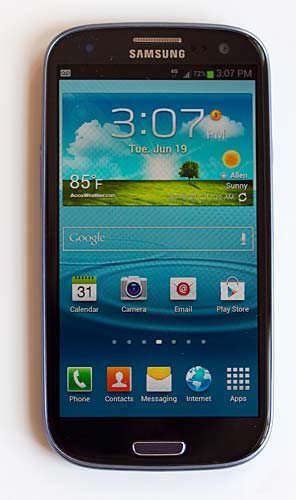
Samsung Galaxy S III
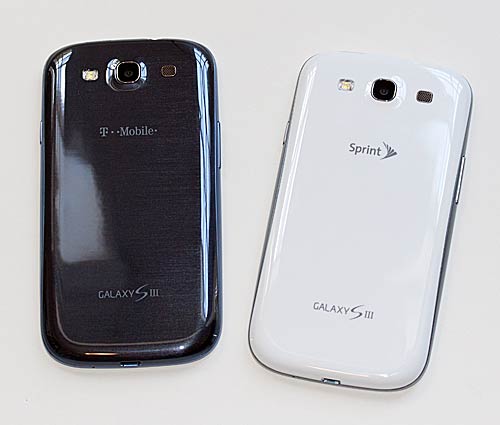
In this review we look at the US model in the form of the Sprint and T-Mobile versions. Sprint, AT&T and T-Mobile launched this phone on June 21 for $199 with contract for the 16 gig model (Verizon's is coming very soon). The hardware is identical except for the cellular radio and the software is the same other than carrier-added apps. 

The Galaxy S III has a 4.8" HD Super AMOLED 720p display and it runs on a 1.5GHz dual core Snapdragon Krait CPU, which is one of the fastest mobile CPUs on the market. It has 2 gigs of RAM rather than the usual 1 gig. Some carriers will offer a 32 gig internal storage version at a higher price. Since the phone has a microSD card slot, you really don't need boatloads of internal storage. 

There's a front 1.9MP video chat camera and a very good rear 8MP camera with flash. The phone has dual band WiFi 802.11b/g/n and Bluetooth 4.0 plus a GPS. So is the Samsung Galaxy S III worth all the hype? Read on to find out.
Samsung Galaxy S III
Design and Ergonomics
While HTC has taken chances and evolved their high end One phones with unibody polycarbonate casings and a new look, Samsung sticks with what works. 

The phone is made of plastic and it has the usual paper thin back cover. Both the Pebble Blue and Marble White models have a high gloss finish that looks attractive even if it doesn't look chic and expensive. The blue model has light blue sides that morph into a darker metallic, striated back. It looks cool but attracts fingerprints like mad. The white model is more organic looking (Samsung was going for curvy, humanistic design with the GS3) and it shows fingerprints much less. Despite the 4.8" display, the Galaxy S III is about the same size as a 4.5" smartphone and it's nearly identical in size to the HTC One X. It's by no means a behemoth like the Samsung Galaxy Note.

Like most Samsung smartphones, the power button is on the upper right side and the volume controls are on the opposite side (making it easy to hit both power and volume at once by accident). Despite that complaint, on a tall phone like the S III, it is easier to reach the power button when it's on the side rather than on the top like most other brands. 

The micro USB port is on the bottom and the headphone jack is up top. The microSD card slot is under the back cover and there's no need to pull the battery to swap cards. GSM models with a SIM card slot have a micro SIM card slot near the removable battery. The GS3 has a notification LED--a rarity on Samsung Android smartphones. If you turn the LED feature on, the light will blink until you've taken care of whatever it's notifying you about.

While the Samsung Galaxy S III falls far behind the HTC One X and One S in terms of materials and aesthetics, it is a solidly built phone that's decently attractive. 

And for those of you who love the hardware home button (the kind that moves and clicks) that Samsung offers on many overseas models, it's alive and well here. Two capacitive buttons flank it for Menu and Back, similar to Gingerbread phone models. Rather than a dedicated ICS multi-tasking button, you'll press and hold the home button to see a list of recently run applications. Double-tap the home button to launch S Voice (voice command).


Display

The 4.8" HD Super AMOLED display would've been really exciting a year or two ago, but these days IPS and advanced LCDs offer sharper text, wider viewing angles and better outdoor visibility. We'd love to see Samsung move away from Super AMOLED displays in their most expensive phones; they once were a competitive advantage but now hobble the phone. 

The 1280 x 720 display has a Pentile Matrix that uses fewer subpixels than LCDs, and the result is slightly reduced sharpness. Still, there are a lot of pixels here thanks to the high resolution, and we suspect many Super AMOLED fans will enjoy the display. Super AMOLED displays have better than life colors, though the colors are more in control here and less cartoony, and black levels are phenomenal. 

White levels are Super AMOLED's weak spot and whites aren't quite as bright as LCDs and they still have a slight blue tint, despite the GS3's improved color balance. The display's colors pop, but the screen isn't hugely bright. Note that Samsung has a power saving feature that automatically dims whites to save power and we suggest turning this off to avoid dingy whites (the power drain is negligible). 

Samsung's auto-brightness as ever tends to be too dark, so we had to go with manual brightness to suit our eyes. I don't mind manual brightness but that means having to adjust it when outdoors under sunlight because the display is hard to see at 50% brightness (my preferred indoor brightness setting).

Phone and Data

The Samsung Galaxy S III has superb voice quality on both Sprint and T-Mobile. Samsung really knows how to make an excellent voice phone. Incoming and outgoing voice are loud and very clear with no background noise or digital distortion. Just in case call quality isn't already stellar enough for you, there's a volume boost setting for noisy environments and EQ settings-- yes EQ isn't just for music players anymore.
On both the T-Mobile and Sprint versions our data connection sometimes dropped for a second every so often. That makes me think there's a firmware issue since it occurs on two different carriers, and I'd assume Samsung could fix this with an update if it proves to be a problem for others.

The T-Mobile version has 42Mbps HSPA+, and that provides excellent data speeds that didn't make me pine for LTE. Our phone averaged 11Mbps down and 1.5Mbps up. The Sprint version has 3G EV-DO Rev A and 4G LTE, but Sprint's LTE network isn't yet live, so we had to use their sluggish 3G network that averaged 400k down and 350k up in our area of the Dallas metroplex. Sprint's version has a feature that will automatically turn WiFi on if the phone is in range of a known WiFi network and that certainly helps. AT&T and Verizon versions have both 3G and LTE, and both carriers have robust LTE networks with fast data speeds. All carrier versions have the mobile hotspot feature that turns your phone into a high speed wireless modem for laptops, tablets and other devices (this may require an additional monthly charge).

Performance and Battery Life

All US carriers are going with the 1.5GHZ dual core Snapdragon S4 CPU (because it's compatible with LTE) rather than Samsung's latest Exynos CPU. That's not a bad thing since the Snapdragon S4 is a top performer that holds its own against the Exynos and quad core Tegra 3. It manages strong battery life as well, and the Galaxy S III on T-Mobile and Sprint (neither running on LTE) had no trouble making it through a full day on a charge with moderate use. When we get our hands on the LTE Verizon and AT&T models, we'll update this review with info on their battery life.

The Galaxy S III benchmarks similarly to other 1.5GHz Qualcomm S4 smartphones like the HTC One X. It falls just a few points behind the One X, and it feels responsive despite the demands of TouchWiz 4. Is it one of the fastest Android phones currently on the market? Yes it is. Does it feel faster than the iPhone 4S? Not so much, but that's an Android vs. iOS issue. 

The phone has Adreno 225 graphics, and that's a capable graphics processor that can handle the latest 3D titles well. We tested a variety of games that worked perfectly, though Max Payne didn't draw on screen controls on the GS III, making it impossible to play. That seems to be a compatibility issue with some Samsung models and the developer is working on that issue.
Benchmarks
  Quadrant GLBenchmark 2.1Egypt Offscreen AnTuTu Sunspider JavaScript Test
Samsung Galaxy S III 5009 53 fps 6826 2027
HTC One X 5001 56 fps 7074 1617
HTC One S 5102 51 fps 7011 1825
Samsung Galaxy S II Skyrocket 3346 33 fps 5367 2237
Samsung Galaxy Nexus 2753 N/A 5985 2175

*Note that the Sprint and T-Mobile versions benchmarked identically with a less than 15 point difference in Quadrant and AnTuTu.

Software

The smartphone runs Android OS 4.0, the latest and greatest version of that OS. It has Samsung TouchWiz 4, and if you're a Samsung owner, the UI will look very familiar to you. In fact, it really doesn't resemble vanilla Android at all, and Samsung goes farther than HTC's Sense to skin Android (watch our video review to see TouchWiz in detail). You get Samsung's usual custom app icons, their widgets for various Samsung apps and services like Media Hub, S Memo, S Calendar (it now skins Calendar instead of being a separate app) and Samsung's music and video players as well as a host of new widgets. There are many, many screens of widgets to choose from out of the box. 

 Samsung's own app store is on board, as is their Buddy Photo Share feature, AllShare Play DLNA streaming, a wireless group PowerPoint presentation feature, and a proprietary Galaxy S III to Galaxy S III hybridization of Android Beam NFC and WiFi Direct called S Beam. Honestly, there's more software here than most of us can wrap our heads around. Samsung's software push is perhaps excessive: some of the apps and features feel more like buried gee-whiz gimmicks than stuff that's easy to use and necessary. That said, you can explore what you wish and ignore the rest.

The most talked about feature is Samsung's S Voice. It's Vlingo on steroids and it tries to fight Siri on the iPhone but loses. Where Siri does a pretty good job of hearing and understanding us, S Voice seems like my partially deaf grandma from the old country whose English is a little quirky. It helps if you talk quite loudly at the phone when issuing commands, and forget using it in noisy environments. Like Siri, it sends your commands to a server using the data connection and the server interprets those commands and tells the phone what to do.

 If your data / WiFi connection is slow or down, you'll get "sorry, network connection error" messages. Check out our video review to see S Voice in action. It is useful for most common tasks like checking the weather or your next appointment, but it doesn't do well with those fanciful natural language queries that Siri handles so well like "what's the meaning of life?" 

You can set the phone to always listen for your command (prefaced with something like "hi Galaxy"), and that can impact battery life. Alternatively, you can set it to run whenever you double-press on the home button, which doesn't affect battery life.

One of our favorite features is how the phone will automatically call the person you're currently texting if you put the phone to your head when viewing that conversation. And we really like the Smart Stay feature that uses the front camera to see if you're looking at the phone's screen and prevents it from turning off while you're looking at it (but why isn't this feature turned on by default?). Less useful but cool if you want to impress your friends is the PIP (picture in a picture) feature where you can play a video in the Samsung video player and tap a button to keep that video running in a small window while you're in other apps.

Camera

Like the Galaxy S II, the S III has an 8 megapixel camera that can shoot 1080p video, but quality has improved over the S II. We still noted some exposure issues in bright outdoor shots where the camera rendered hazy images, but the new HDR feature helps greatly with that. Dedicated image processing chips are the next big thing in high end phones (the HTC One X has one too), and that allows for extremely quick shot times. Again, like the HTC One X and One S, you can shoot photos while simultaneously recording video but there's no slow motion option like that of the One X. There are plenty of effects to play with: exposure, macro mode, face detection, smile detection and panorama. This is a very capable camera, though we give the edge to the HTC One X for image quality.

Video quality is excellent at 1080p and 30fps: video is sharp and colorful with smooth motion and little in the way of blockiness. The continuous autofocus sometimes hunts when several subjects are in motion at once, but overall it's great stuff.

For those of you who can't be social enough, there's Share Shot: a feature where you and your GS III-toting buddies can share photos in real time over a WiFi Direct connection. Speaking of social, Buddy Photo Share will implore you to tag faces and assign photos to your social networking friends. This was a hit or miss feature and it sometimes didn't recognize nearly identical shots of the same person, and it thought a houseplant was my best friend.

Conclusion

Is the Samsung Galaxy S III an excellent smartphone? Yes it is. Given the millions of preorders, I suspect many of you would buy this no matter what I said about the phone. That speaks of Samsung's momentum in the smartphone market and their excellent track record. Is this Samsung's best Android phone ever? Yes it is, but there is room for improvement.

 I'd love to see Samsung use high quality materials and cutting edge designs in their top tier phone. I wish they'd cut down on the absurd number of features and apps introduced with the GS III, and instead focused on making a few core apps really solid. S Voice is a fantastic feature that needs more development (it's hard of hearing, prone to network connection errors and needs more natural language AI to compete with Siri). 

With more work, it could really sell folks on the Galaxy S III. If Samsung axed the Group Cast PowerPoint presentation sharing over WiFi feature to spend more time on S Voice and facial recognition in photos, the smartphone world would be a better place. Software and cosmetic gripes aside, the Samsung Galaxy S III has phenomenal voice quality, a fast CPU and good battery life for a powerful phone. If you buy one, you probably won't be disappointed.
Price: Starting at $199 for 16 gig model with contract

New iPad vs. Asus Transformer Pad Infinity TF700 Comparison

New iPad vs. Asus

The New iPad and the Asus Transformer Pad Infinity TF700, two top tablets whose price starts at $499 (though a more direct comparison is the $599 32 gig WiFi New iPad and $499 32 gig WiFi Transformer TF700) . So how do you pick, assuming you're not lucky enough to buy one of each? Both feature extremely high resolution IPS displays, elegant designs that include liberal use of aluminum and fast internals. The new iPad runs iOS 5 while the Infinity TF700 runs Android 4.0 Ice Cream Sandwich. And that's the most important differentiator: the OS and philosophy behind the respective ecosystems make for a very different experience.


No, I'm not going to say one OS is better than the other. But I will say that the New iPad and iOS are perfect for those who are techno-phobic or simply want a product that just works. What do you give up? The New iPad's UI isn't customizable beyond the wallpaper, and you're pretty much locked into iTunes and iCloud for syncing, apps and in-app content purchases. You can stream Netflix, Hulu, and as of today Amazon Instant Videos, use a wide variety of streaming radio services and load eBook apps like Kindle and Nook (though you may have to use your browser rather than the app to make new purchases).

Android is open season: in-app purchases are cool, and there are a variety of movie stores for Android (often bundled by carriers who get a cut of your purchases). You can customize the home screens and tinker with custom UIs and app launchers. You can load content via the Transformer Pad TF700's microSD card slot or use USB flash drives and hard drives (NTFS and FAT32 both supported). You'll need to buy Asus' $15 USB host adapter or the $149 keyboard dock to use USB peripherals. Apple's $29 Camera Connection Kit includes two dongles (one USB and one SD card), but the New iPad puts out very little USB power so many peripherals won't work.


As with previous Transformer vs. iPad comparisons, it's clear that the iPad is geared toward quick and easy consumption (movies, music, web browser and email) while the Transformer TF700 is more of a computer replacement with a focus on both content consumption and creation. What do you give up? Speed and stability. While my TF700 is very quick, it does occasionally slow down and need a reboot. I rarely need to reboot the iPad and it never crashes. When one company makes the OS and another makes the hardware, you lose the speed and stability that a tight platform integration offers.

With both platforms you can access cloud storage services as well. The Transfomer Pad Infinity TF700 has a micro HDMI port that mirrors the tablet's screen. Apple sells a $39 HDMI adapter and both tablets support HDMI 1.4 and HDCP. Apple has AirPlay for wireless streaming viao the $99 Apple TV, while the Transformer uses dLNA (free, but it uses a file manager style interface that's not as newbie-friendly).

Currently Asus doesn't offer a 3G/4G version of the Transformer Pad Infinity TF700. You can use your smartphone's Mobile Hotspot feature, a dedicated Mobile Hotspot device (MiFi) or WiFi for data. The iPad is available in WiFi and WiFi + 4G LTE models. Keep that in mind if you need data on the go and don't have a smartphone with Mobile Hotspot.


Display

The New iPad has a 2048 x 1536 IPS Retina display. The Asus Transformer Pad Infinity TF700 has a 1920 x 1200 Super IPS + display. Honestly, it's a tie. Both have very wide viewing angles, good color saturation, reasonably good color accuracy and super-sharp text. Both displays beat other tablets on the market. The Transformer Prime gets a point for extreme brightness, which is handy outdoors. Super IPS + mode gets you better than 600 nits of brightness to combat the sun.
Winner: Asus Transformer Pad Infinity TF700 for its super bright display.


Apps

You know the drill: the iTunes app store has more apps for tablet than the Google Play Store. While Android phone apps are catching up nicely with the iPhone, tablet optimized apps still lag. That said, the popular commercial staples are available on both platforms, from MS Office compatible suites to image editing to news consumption. Netflix, CNN, Kindle, Nook, Pulse, Facebook, Twitter, IMDB and much more.

The Android tablet gaming scene has improved greatly, and we now have a good selection of top notch games. But these games often come out for the iPad first, with a few weeks or months delay for Android (we're looking at you, Max Payne Mobile). There are more than enough tablet apps to make the Transformer Infinity TF700's experience rich, and it plays games wonderfully. But if gaming is high on your list, iOS is still the winner with a huge selection of high quality games.

Winner: New iPad


Battery Life

This is a tie; both tablets manage 9 hours of use on a charge. Both have batteries that are sealed inside. You can extend the Transformer's battery life to 14 hours with the $149 keyboard dock, which has a battery that charges the tablet.

Winner: Tie for naked tablets. Asus Transformer Pad Infinity TF700 wins when paired with the keyboard dock.


source

MacBook Pro review

MacBook Pro reviewMacBook Pro review

When the MacBook Pro with Retina display is in the game, Apple's "regular" Pros may seem a bit like also-rans. After all, why would you choose them when you could get a brilliant 15-inch 2,880 x 1,800 IPS panel and a Core i7 Ivy Bridge processor? Well, price, for one thing. While we walked away from our Retina MBP review mighty impressed, that model starts at $2,199. The latest crop of Pros, meanwhile, keep the same pricing scheme as last year's models ($1,199 and up), but step up to Intel's third-generation Ivy Bridge processors. We took the entry-level 13-incher for a spin to get a feel for how the dual-core Core i5 CPU, 4GB of RAM and Intel HD Graphics 4000 stack up to the competition. Read on to see how it fared.

Look and feel

The latest MacBook Pros look nearly identical to their 2011 predecessors, with the same aluminum, unibody construction, backlit, island-style keyboard and glass trackpad. The dimensions and weight also remain unchanged: the 13-inch version tips in at 4.5 pounds and measures 0.95 inches thick, while the new 15-inch Pro weighs 5.6 pounds. Those who salivated when Apple revealed the Retina model's 0.71-inch-thick, 4.46-pound body may be unimpressed by this guy's slightly beefier profile, but the Pro looks as polished as ever, and is definitely compact enough that toting it around shouldn't be an issue.
MacBook Pro review

The latest system ships with two USB 3.0 sockets (up from USB 2.0), but otherwise you're looking at a very familiar selection of ports. Most of those connections, including Gigabit Ethernet, Thunderbolt and the SDXC card slot, are crammed on the left edge of the machine, with the slot-loading optical drive occupying the right side. While the Retina Pro and the latest MacBook Airs sport new MagSafe 2 connectors, the 13-inch Pro (along with its 15-inch sibling) still has the last-gen version.

We won't spend too much time rehahsing the MacBook Pro's keyboard and touchpad, as they haven't changed since we last took a peek. Still, it's worth reiterating that these are two of the strongest weapons in Apple's hardware arsenal. Typing on the chiclet-style keys is a pleasure, and the glass trackpad is smooth and responsive. Similarly, the display and sound don't pack any surprises. The 1,280 x 800 panel delivers crisp images with accurate colors, and viewing angles are wide enough to comfortably watch movies from off-center. That said, we wouldn't mind a higher resolution -- after all, the 13-inch Samsung Series 9 boasts a stellar 1,600 x 900 panel, and ASUS' Zenbook Prime lineup includes systems with up to full 1080p resolutions. And while we appreciate that the speakers pump out sufficiently loud audio, songs have a thin, somewhat tinny quality to them. If you're going to spend $1,200-plus on a laptop, you may as well spring for some desktop speakers too.
Performance
OS X benchmarks
Geekbench
Xbench
Battery life
MacBook Pro (mid-2012, 2.5GHz Core i5, Intel HD Graphics 4000)
6,817
368
6:51
MacBook Air (mid-2012, 1.8GHz Core i5, Intel HD Graphics 4000)
6,195
321
6:34
MacBook Air (mid-2011, 1.7GHz Core i5-2557M, Intel HD Graphics 3000)
5,373
N/A
5:32
MacBook Pro with Retina display (mid-2012, 2.6GHz Core i7)
11,591
486
7:49
MacBook Pro with Retina display (mid-2012, 2.3GHz Core i7)
11,082
457
9:22
MacBook Pro (early 2011, 2.2GHz Core i7-2720QM, Radeon HD 6750M / Intel Graphics 3000)
9,647
340.1 (Radeon) / 157.78 (Intel)
7:27
MacBook Pro (early 2010, 2.66GHz Core i7-620M, GeForce GT 330M)
5,395
228.22
5:18
MacBook Air (late 2010, 1.83GHz Core 2 Duo, GeForce 320M)
2,717
117.38
4:34
Note: higher scores are better.

Along with just about every recently released laptop hitting the market, the mid-2012 MacBook Pro steps up to Ivy Bridge. All models, including our entry-level unit with a 2.5GHz Core i5 processor, 4GB of RAM and a 5,400RPM 500GB hard drive, benefit from this upgrade. On synthetic performance tests such as Geekbench and Xbench, at least, the 13-inch Pro doesn't set any records. The Retina model scored more than 4,000 points higher on Geekbench, and MacBook Pros of years past with discrete graphics also blew this guy out of the water. In Xbench, this system proved its mettle a bit more. Its score of 368 tops all older Macs we've tested -- save, of course, for the new Retina-toting model.

Windows benchmarks
PCMark Vantage
3DMark06
MacBook Pro (mid-2012, 2.5GHz Core i5, Intel HD Graphics 4000)
6,712
5,804
Acer Aspire Timeline Ultra M3 (1.7GHz Intel Core i7 2637M, Intel HD 3000 / NVIDIA GeForce GT 640M, 1GB)
11,545
11,128
Lenovo IdeaPad U310 (1.7GHz Core i5-3317U, Intel HD Graphics 4000)
8,345
4,549
Sony VAIO T13 (1.7GHz Core i5-3317U, Intel HD Graphics 4000)
8,188
3,847
Dell XPS 14z (2.8GHz Core i7-2640M, Intel HD Graphics 3000 / NVIDIA GeForce GT520M, 1GB)
7,982
10,508
Dell XPS 13 (1.6GHz Core i5-2467M, Intel HD Graphics 3000)
N/A
4,130
Note: higher scores are better


We used Bootcamp to install Windows so that we could put the laptop through its paces in PCMark Vantage and 3DMark06. Interestingly, its results painted a similar picture to what we saw when running Lion (we ran these tests before the Mountain Lion upgrade hit, though as we said in our review of the new OS, performance gains are negligible). The Acer Aspire Timeline Ultra M3, with discrete graphics and a Core i7 processor, crushed the Pro with a more than 5,000-point delta in 3DMark06, but other systems with integrated graphics, such as the Lenovo IdeaPad U310, landed in the same ballpark, though most still scored a bit higher.
MacBook Pro review

Gaming

While Intel HD Graphics 4000 are an improvement from the 3000 edition, the lack of discrete graphics holds you back from any soul-crushing gaming power. Still, that doesn't mean you can't fire up your favorite titles. When we played some World of Warcraft, frame rates stayed within the 30 to 60 fps range. When running Windows, the system averaged a respectable 60 fps in Batman: Arkham Asylum.
Still, you're not buying a MacBook Pro to get your frag on (or you shouldn't be, anyway), so the MBP's modest graphics performance is far less important than its day-to-day capabilities. In that regard, this machine is more than passing. Throughout our testing, we worked across three browsers, ran a chat client, wrote in TextEdit and did some light gaming, all without noticing any glitches or sluggishness.

Battery life

Laptop
Battery life
MacBook Pro (13-inch, 2012)
6:51 (OS X) / 4:25 (Windows)
MacBook Pro with Retina display (mid-2012, 2.3GHz Core i7)
9:22
MacBook Pro with Retina display (mid-2012, 2.6GHz Core i7)
7:49
Samsung Series 9 (15-inch, 2012)
7:29
MacBook Pro (early 2011, 2.2GHz Core i7)
7:27
Lenovo ThinkPad X230
7:19
MacBook Air (13-inch, mid-2012)
6:34 (OS X) / 4:28 (Windows)
HP Folio 13
6:08
Toshiba Portege Z835
5:49
ASUS Zenbook UX31
5:41
MacBook Air (13-inch, 2011)
5:32 (OS X) / 4:12 (Windows)
HP Envy 14 Spectre
5:30
MacBook Pro (early 2010, 2.66GHz Core i7)
5:18
Lenovo IdeaPad U300s
5:08
Samsung Series 5 Ultrabook (14-inch, 2012)
5:06
Dell XPS 13
4:58
Samsung Series 9 (13-inch, 2011)
4:20
ASUS Zenbook Prime UX21A
4:19
Acer Aspire S3
4:11

In our video rundown test, the 13-inch Pro lasted six hours and 51 minutes in OS X, which is in line with Apple's rated battery life of up to seven hours. That longevity is also on par with other Macs, including the early-2011 Pro, which lasted about 40 minutes longer. When we ran the test on the Windows side, the system logged four hours and 25 minutes, which puts it in line with ultraportables such as the 13-inch Series 9.
More anecdotally, the laptop's 63.5Wh battery gave us roughly five hours of runtime when we had about six programs running in the background while surfing the web, writing emails, working in the word processor and doing occasional photo editing.

Software and warranty

The new Pro originally shipped with OS X 10.7 (Lion), though if you're a regular reader of this site you know that Mountain Lion has arrived. If you purchase the new Pro or one of Apple's Ivy Bridge-powered MacBook Airs now, you'll get 0S X 10.8 out of the box. If you don't have a 2012 Mac, the upgrade will cost you $20.

You can get a more in-depth look at the OS in our full review, but a few highlights include deep iCloud integration, all-new features such as Messages and the Notification Center. Like other Apple computers, the MacBook Pro is covered by the company's one-year limited warranty, which includes 90 days of free phone support. You can extend that coverage for up to three years with the Apple Care plan, which will set you back $249.

Configuration options and the competition

Our configuration of the 13-inch Pro goes for $1,199. That price gets you a 2.5GHz Core i5 CPU, 4GB of RAM, a 500GB hard drive spinning at 5,400 RPM and Intel HD Graphics 4000. The $1,499 configuration offers a 2.9GHz Core i7 processor, 8GB of RAM, a 5,400RPM 750GB hard drive and Intel HD 4000 Graphics. You can opt for a 128GB SSD for $200 (512GB of solid-state storage is a $1,000 option). Though our version of the Pro ships with a 13-inch display, the laptop is also available in the 15-inch form factor. Incidentally, the larger version is configurable with a 1,680 x 1,050 screen, which could be reason enough for some to make the step up. (The larger model also offers quad-core processors, which this smaller guy doesn't.) Still, let's take a look at the larger playing field. For the sake of keeping the list relatively tidy, we'll stick to similarly speced systems in the 13- to 15-inch range.

The Retina display model may be an expensive alternative to the standard Pro, but the new MacBook Air is similarly priced (starting at $1,199 for the 13-inch model) and offers faster performance thanks to its SSD. The Pro does offer more storage (up to 750GB) and an optical drive, but it's also heavier.

The $1,400 HP Envy Spectre 14 offers a Core i5 Ivy Bridge CPU, Intel HD Graphics 4000, a 128GB SSD and, most importantly, a gorgeous 1,600 x 900 display. If you prefer the 15-inch size, the Envy 15 -- going for $1,100 for a Core i5 CPU, 6GB of RAM, a 750GB hard drive and AMD Radeon graphics -- is a solid contender. Its design unabashedly evokes the MacBook Pro, though, which depending on where you stand could be a bad or a good thing. The 1080p, IPS Radiance display offers great viewing angles, but colors, especially red and purple, were a bit off when we tested the machine.

If you want discrete graphics in this price range, you're in luck. The $1,300 Dell XPS 14z comes with NVIDIA's GeForce GT520M CPU along with Intel HD Graphics 3000, plus a Core i7 CPU. Its performance on graphics benchmarks isn't much different than the Pro's, though it's worth mentioning it runs a Sandy Bridge processor. What the laptop does have in its favor, though, is a comfortable keyboard and a nearly bezel-less design that gives you plenty of screen real estate. Likewise, the XPS 15z is a worthwhile option for those of you who prefer a slightly larger screen. A $1,100 configuration gives you a Core i5 CPU, NVIDIA graphics with 2GB of dedicated memory and a 750GB hard drive.

For $1,000, Sony's VAIO S 13 runs a Core i5 Ivy Bridge CPU clocked at 2.5GHz, includes 500GB of storage and offers discrete graphics courtesy of NVIDIA's GeForce GT640M chip. For the same price, the 15-inch VAIO S 15 includes the same processor, a 1,920 x 1,080 display and NVIDIA GeForce GT640M LE graphics, all in a magnesium alloy body that weighs 4.42 pounds. If you're willing to venture north of the MacBook Pro's asking price but need to stop short of the Retina's realm, the 13-inch VAIO Z (now $1,600) is very nice indeed. It packs a Core i5 Ivy Bridge CPU with 128GB of solid-state storage, and its 2.6-pound, carbon fiber design is both lightweight and understated. The external Power Media Dock offers discrete graphics, not to mention a Blu-ray drive, so you can get more solid graphics performance if you're willing to shell out $500 more.

We'll only mention the Retina display model in passing. The MacBook Pro's aspirational older brother is costly, yes, but the screen is amazing, and with a quad-core CPU, NVIDIA GeForce GT 650M graphics and up to 16GB of RAM, it's an ace performer.
Wrap-up
Equipped with a new Core i5 Ivy Bridge processor and Intel HD Graphics 4000, this year's MacBook Pro is a capable machine. Is it the highest-performing system out there? Nah -- and without discrete graphics or an SSD, that's hardly a surprise. This is a solid laptop, even with the entry-level specs, but if you can part ways with a bit more dough, you'll be a happier camper with a Core i7, SSD-equipped configuration. If your heart isn't set on the 13-inch form factor, you can always go for the 15-inch Pro, which is available with an NVIDIA GT 650M GPU, not to mention a higher-res display.

More broadly, though, Apple's new MacBook Pro with Retina display has put a wrench in the company's otherwise straightforward lineup. If you're an OS X fan, you're no longer making a simple decision between the Air's portability and the Pro's graphics chops / ample storage -- a brilliant screen is vying for your dollars now, too. If your needs are fairly simple, just go for the Air: it's a faster performer, and your back will thank you. If you need discrete graphics and an optical drive (or just can't afford the Retina model), the Pro remains a solid bet.

Source
 
Support : Creating Website | Johny Template | Mas Template
Copyright © 2011. GADGET ONLINE - All Rights Reserved
Template Created by Creating Website Published by Mas Template
Proudly powered by Blogger