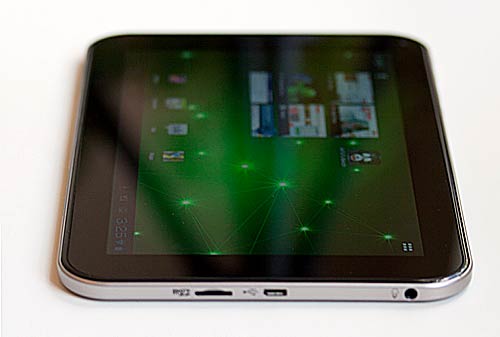
The Acer Iconia Tab A700 is the 1080p companion to Acer's quad core Android OS 4.0 Iconia Tab A510.
It shares the same design, casing, quad core NVidia Tegra 3 CPU with 12 core GeForce GPU and a 10.1" LED backlit LCD. The A700's impressive 1920 x 1200 resolution sets it apart from most other Android tablets on the market that run at 1280 x 800 resolution. The A510 impressed us with its top notch CPU, pleasing display and USB peripheral support, and the A700 is all that plus a sharp high res display.
Specs:
- 1.3GHz NVidia Tegra 3 T30S quad core CPU with GeForce graphics
- 1 gig DDR2 RAM, 32 gigs storage
- 10.1", 1920 x 1200 multi-touch display
- WiFi 802.11b/g/n (single band), Bluetooth and GPS
- 2MP front camera and 5MP rear camera
- 9800 mAh Lithium Ion battery, 36.26 Wh, 2 cell
- USB host for USB peripherals (cable included)
- Android OS 4.0.4 Ice Cream Sandwich
- Ports: micro USB (with USB host), micro HDMI, micro SD card slot, 3.5mm audio
- Colors: available in silver and black colors
- $449 US
Design and Ergonomics
The A700 is a dead ringer for the A510 and in fact looks much like the Acer Iconia Tab A200 (Acer's budget 10.1" offering) with more ports. The design is rubbery-rugged: the back has a soft touch finish and the 0.40" tablet is by no means thin but it feels good in hand and the added girth allows for the same 9800 mAh battery capacity found in the A510. The tablet weighs 1.47 pounds and that's not so heavy that we'd dock major points but it certainly doesn't earn points. The textured soft touch back and straight sides make it easy and comfortable to hold, though your hands may tire after an hour of use (the same is true of many of last year's 10" Android tablets). There are no abrupt or sharp edges to dig into your palms and the tablet feels solid.
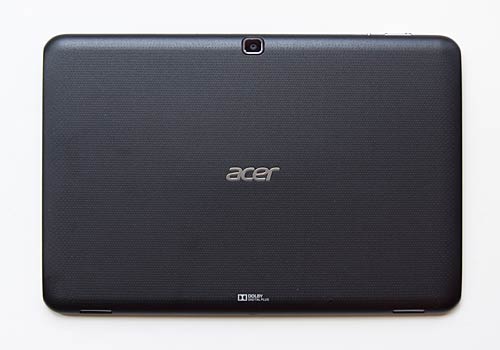
We find ourselves wishing for an updated design that matches the high end specs and full HD display. This is the third Acer tablet to sport the chunky but comfortable design and it just doesn't say "high class, trendy technology" the way the New iPad, Asus Transformer Infinity TF700 and Toshiba Excite 10 do. We forgave the A510 for looking like its cheaper brother the A200 because Acer managed to squeeze a huge battery and impressive internals into the casing, but we're more than ready for a thinner and lighter revision with more panache.
Like the Acer Iconia Tab A510 the bottom right rear corner gets hot when playing demanding 3D games. There's a small hotspot (0.25" diameter) that reached 108F when we played Dark Meadow for 15 minutes. The surrounding area is 95F and it gets gradually cooler from there. The soft touch finish diminishes heat so it doesn't feel dangerously hot as aluminum might, but it did give us a sweaty hand.
Stereo speakers fire from the bottom edge and they're particularly loud and full for a tablet. They get some help from Dolby Mobile 3 audio, and this is one of the few tablets that doesn't send us running for headphones or external speakers when watching a 2 hour movie.
The tablet has a multipurpose charging port at the bottom that also accepts the included micro USB to USB host cable for USB peripherals. The charger tip is notched to prevent you from using it with your smartphone or other device because the output voltage and amperage is quite high so it can charge the big battery inside.
The tablet has 32 gigs of internal storage and a microSD card slot under a door on the right side. There's a blank slot beside the SD card slot for a SIM card holder should Acer offer a 3G/4G version. Our model is WiFi-only.
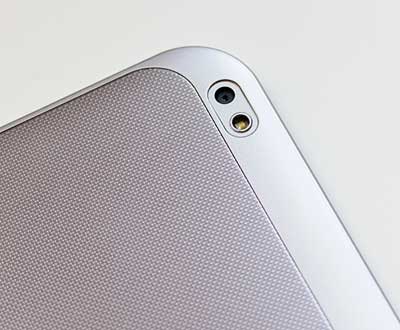
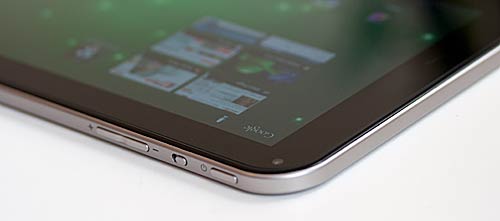
The micro HDMI port lives on the right side too, and the power button and 3.5mm audio jack are on the left side. The volume controls are up top, and they have dots so you can tell volume up from volume down by feel. The rotation lock sensor is located next to the volume controls. The controls are rattle-free and are easy to operate but not easy to accidentally press. The front video chat camera is slightly off center toward the right above the display and the rear 5MP camera is dead center near the top of the tablet's back. |
|
Acer Iconia Tab A700 Video Review |
1920 x 1200 Display
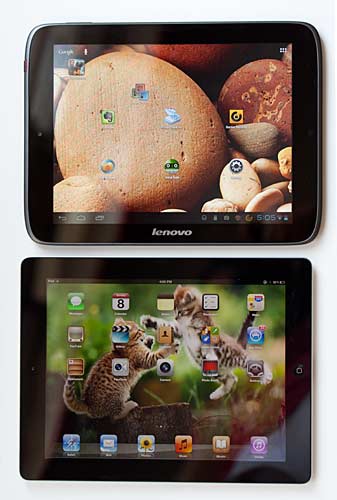
You're here to read about the Acer A700's high resolution display, so let's cut to the chase. Yes, the display is very sharp thanks to all those pixels packed into a 10.1" LCD. At 224 ppi pixel density, it is a bit lower than the New iPad's 264 ppi, but still more pixels than many of us can examine easily with the naked eye. Thanks to Android's dpi scaling, text isn't micro-sized and in fact icons and text are the same size as on standard 1280 x 800 tablets. Those words and icons simply look sharper and more perfectly defined, making the Acer Iconia Tab A700 a great choice for eagle-eyed eBook and PDF users. Text rivals that of the New iPad and images look likewise equally as sharp though colors aren't quite as vibrant.
Viewing angles are very wide, though this isn't an IPS display. Off-angle sharing when watching videos works just fine and brightness is more than adequate for indoor use, though it can't rival the Asus Eee Pad Transformer Prime TF201 and Transformer Pad Infinity TF700 for outdoor viewing and brightness (these tablets have Asus' Super IPS + display. Colors are rich and balanced, without an obvious color cast. Since this is full HD display, you can watch 1080p videos at native resolution with no scaling, and they do indeed look very sharp. The tablet handles 1080p MPEG4 high profile content just fine, and YouTube streaming is a breeze.
Touch response, despite Acer's uncommon touch sensitivity setting option, is poor. Particularly at the edges of the screen, touches too often go unregistered. We died in games all too often because of this, and it can make the tablet seem slow. It's not always a speed issue; it's the touchscreen's failure to respond to touch quickly.
Performance and Horsepower
Here's where things get a little dicey. We expected a performance hit with the vast increase in pixels this tablet has to push around compared to the Acer Iconia Tab A510. But benchmarks were nearly identical, and honestly, the 12 core GPU is probably more than enough to handle the resolution. But the tablet sometimes bogs down when doing simple things like maneuvering through the app drawer or running the web browser on a page without Adobe Flash elements to slow things down. We suspect it's not a hardware issue since this tablet is at the top of the specs heap, but rather software optimization. Acer has some work to do here to make things more fluid. The tablet isn't constantly slow-- it's a random thing. We played the very demanding
Dark Meadow game and Shine Runners without slowdowns, though the sometimes unresponsive touchscreen got us killed more than a few times.
Benchmarks
| Quadrant | GLBenchmark 2.1Egypt Offscreen | AnTuTu | Sunspider JavaScript Test |
| Acer Iconia Tab A700 | 3646 | 58 fps | 10,536 | 1958 |
| Asus Transformer Pad Infinity TF700 | 4915 | 74 fps | 12,229 | 1903 |
| Acer Iconia Tab A510 | 3807 | 69 fps | 10,910 | 1788 |
| Toshiba Excite 10 | 4143 | 63 fps | 11,056 | 1935 |
| Asus Eee Pad Transformer Prime | 3801 | 61 fps | 9846 | 1814 |
| Acer Iconia Tab A200 (dual core Tegra 2) | 1800 | 42 fps | 5025 | 2185 |
| Asus Transformer Pad TF300 | 3425 | 69 fps | 9559 | 2257 |
Wireless, USB Host and Camera
The tablet has single band WiFi 802.11b/g/n, Bluetooth and a GPS that works fine (even with WiFi turned off). There's currently no 3G/4G option in the US. WiFi speeds and range were good, just as with the Acer A510, and we got max upload/download speeds 30 feet from the router through walls. As with the A200 and
A510, we sometimes noticed WiFi performance suddenly drop and a reboot fixed this.
The Acer has USB host, and that means you can use USB peripherals with the Iconia such as keyboards, mice, USB flash drives, game controllers and even portable hard drives. Acer goes one step extra and includes a USB host cable in the box, since those are hard to find in stores. And yes, the tablet supports
NTFS, for those of you who want to use external hard drives formatted NTFS. External storage support is excellent; from microSD cards to flash drives and NTFS self powered-hard drives. The various storage items appear in third party file managers (not just the built-in file manager as with Asus tablets) and their contents automatically appear in Gallery (photos and video) and Google Play Music. The Acer lacks Asus' USB
Ethernet adapter driver, alas.
The tablet has the same 5MP rear and front video chat camera. The 5MP camera is the average among Android tablets, and it takes distinctly average photos and 720p video. It's not bad by any means, but it won't beat the better camera phones on the market like the HTC One X, Samsung Galaxy S III and Sony Xperia Ion.
Software
Once again, we're looking at the same software bundle as the Acer Iconia Tab A510. The tablet runs Android OS 4.0.4 Ice Cream Sandwich with very little UI customization (we rarely see much UI customization on Android ICS tablets). Acer adds their Ring launcher (the bull's eye on the bottom task bar).
Tap it and you've got quick access to four apps of your choosing, browser bookmarks, volume and search. Acer also includes their dLNA client and server for streaming multimedia over your WiFi network, and Acer Print for wireless printing over WiFi (sweet!).
Polaris Office for tablets is on board, and it has a lovely UI and the ability to view, create and edit MS Office compatible documents. VirusScan Mobile is pre-installed and isn't removable though you can disable it.
Battery Life
Like the A510, the Acer A700 has excellent battery life. The huge 9800 mAh Lithium Ion battery makes for better than average runtimes. Our tablet typically lasts 10 to 10.5 hours of actual use time on a charge, and that translates into several days on a charge with moderate use.
Conclusion
Right now, only the Acer Iconia Tab A700 and the Asus Transformer Pad Infinity TF700 have 1920 x 1200 displays. They go neck and neck with the New iPad and its Retina display and they have top CPU and storage specs plus USB host. But the A700's aging design, insensitive touch screen and micro-lags hold us back from feeling truly excited. Hopefully Acer will remedy the performance and touch screen issues, but until then we have to list them as a caveat. The display is truly sharp and lovely to look at, though as with the New iPad's Retina display, you have to look closely to appreciate the improvements that a very high resolution brings.