Headlines News :
Tampilkan postingan dengan label ASUS. Tampilkan semua postingan

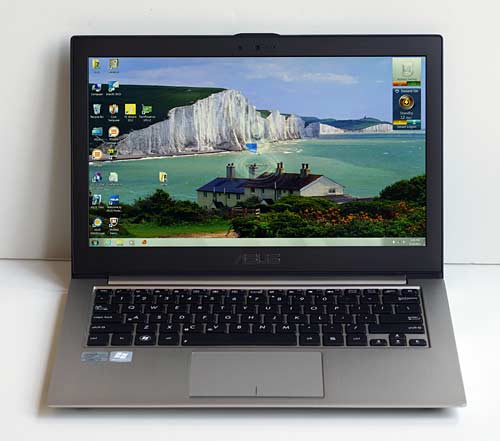
Asus Zenbook Prime UX32VD


Asus Zenbook Prime UX32VD
Asus could have stopped when they made one of the best Ultrabooks on the market (twice). Last year's Zenbook UX31E was one of the best Ultrabooks on the market, despite its flaws. This summer's Zenbook Prime UX31A is once again one of our top picks, and it addressed the UX31E's flaws (keyboard, good but not stellar display). As if the 1080p IPS display on the Zenbook Prime UX31A didn't push the envelope enough, Asus has let loose the Zenbook Prime UX32VD, a near dead ringer for the UX31A but with added goodies: dedicated graphics and upgradable RAM and hard drive. Nice.

Like the UX31A, the Zenbook Prime UX32VD has an impressive 1920 x 1080 IPS display, a backlit keyboard, third generation ULV CPUs and a killer unibody aluminum design. Given the extra space required for upgradable parts and dedicated graphics, the UX32VD is a tiny bit thicker and a little heavier (3.2 pounds vs. 2.86), but it shares the same design, materials and attractive look as the UX31A as well as its 13.3" display size. In fact, so much is the same that this review will share some copy with our UX31A review.

Specs
The Asus Zenbook Prime UX32VD (who picked those final letters?) is an Ultrabook with a 13.3", 1920 x 1080 IPS display, 1.7GHz Intel Core i5 and i7 ULV CPUs (the 1.9GHz i7 is more prevalent and the i5 is more often found in the non-1080p UX32A), a 500 gig conventional hard drive with a small SSD that acts as an Intel Express Cache to speed boot and resume times, 4 gigs of DDR3 RAM and both Intel HD 4000 and Nvidia GeForce GT620M dedicated graphics. Not too shabby for $1,299. The laptop has a unibody aluminum casing that looks every bit as modern, classy and sleek as Asus' more conventional Ultrabooks. 

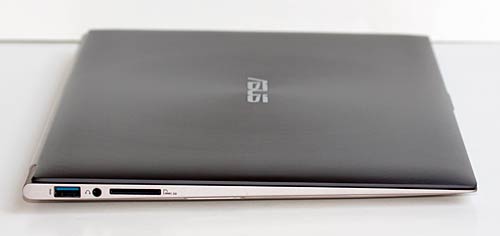
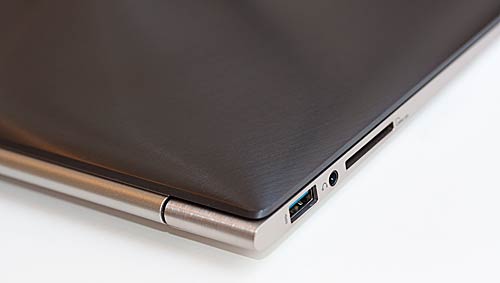
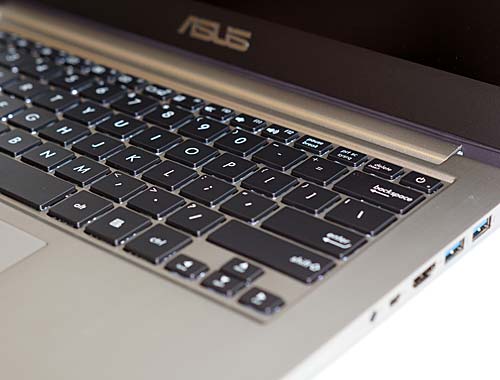
It has dual band Intel WiFi 802.11b/g/n with WiDi, Bluetooth and a 720p webcam. Notably absent is an optical drive, which you won't find on 13" Ultrabooks. The machine has three USB 3.0 ports (two on the right, one on the left), an HDMI port, mini VGA, a 3.5mm jack and an SD card slot. Asus provides a USB 10/100 Ethernet dongle and a VGA adapter.
Asus Zenbook Prime UX32VD

Other Zenbook Prime Models
- The first generation Zenbook UX31E had a lower resolution, non-IPS display and Intel Sandy Bridge CPUs. It looks nearly identical to the UX31A.

- The Zenbook Prime UX31A is available with a 1.7GHz Intel Core i5 CPU (UX31A-DB51) or with a 1.9GHz Intel Core i7 CPU and a 256 gig SSD (UX31A-DB72). A classic Ultrabook by Intel's definition with SSD storage, Intel ULV CPUs and an extremely thin and light design.

- There are custom Best Buy and Amazon models as well. The Best Buy model is the same as the DB51 minus the 1 year accidental damage warranty. The Amazon AB71 has the Core i7 CPU and a 128 gig SSD.

- The Asus Zenbook Prime UX32VD has dedicated Nvidia GT620M graphics (a lower end dedicated GPU) and both the RAM and hard drive are upgradable. The UX32VD ships with a conventional spinning 500 gig hard drive and a small SSD drive that boosts boot and resume times. 

- Lastly, the Zenbook UX32A (no "Prime" in the name) is a low spec model with a 1.4GHz Core i3 ULV CPU, 320 gig conventional hard disk and a lower resolution display (not a good pick).

* The word Prime= 1080p display, an SSD drive and a backlit keyboard. 

Design and Ergonomics
The 3.2 pound UX32VD Zenbook Prime looks almost identical to the Zenbook Prime UX31A, and that's a good thing since that machine is simply stunning looking and well made. The casing is metal and rigid, though the keyboard deck is softer and we noted some trampolining in the center that will drive serious typists a little mad. The lid and bottom panel as well as the keyboard deck are very firm in contrast. The UX32VD is just a little thicker than the 0.67" UX31A, but it's still very slim at 0.7".

The combo of a dark metal swirl lid and a brushed stainless steel hinge barrel and bottom look great. The laptop looks and feels like a high quality piece of tech that holds its own against the MacBook Air. Like the Air, it tapers and is 5.5 mm thin at the front and 9mm at the rear. Looks are subjective, but I think the Zenbook Primes are some of the most attractive Ultrabooks on the market. The metal edges are well machined so there's no roughness or sharpness, but the front tapers to a fine point that might bother some folks' wrists.

The keyboard is much improved from Asus' first generation Ultrabooks, the UX31E and UX21E. The Chiclet style backlit keyboard has good tactile feel and travel by skinny Ultrabook standards. My only complaint is the mushy give in the center and right-of-center keyboard area. It's not a deal breaker, but it's not as good as the UX31A keyboard. 

The Elan trackpad is the same as that of the UX31A, and it's much, much better than the UX31E trackpad. However, Asus' drivers are the weakest part of the equation and I found the trackpad behaved better once I removed Asus' trackpad software and stuck with Elan's. Asus has issued a few driver updates for the trackpad, and it's now usable though not better than Elan's software.

1080p Display
The 13.3" matte 1920 x 1080 panel is simply gorgeous: very bright with lovely balanced colors and high contrast. Text is very sharp and black levels are excellent. Asus didn't skimp here. The panel is brighter than most notebooks on the market except the UX31A. The display will likely set the Zenbook Prime series ahead of the competition for some time. Since this is an IPS panel, viewing angles are very wide, and there's no need to angle the display forward and back to find the sweet spot as with TN panels. Whites are wonderfully neutral and the display looks as good as the Retina MacBook Pro. Color accuracy is much better than average for a notebook panel and it should please photo pros.

It wouldn't be an Asus product if we didn't have some light bleed, and though light bleed in IPS displays isn't uncommon, Asus seems to have more than their share. What is light bleed? The display may have lighter spots near the edges when viewing black backgrounds like the black bars in letterboxed widescreen movies. Our unit, which came from a local retailer, has a small amount of light bleed along the bottom edge, but it's nothing we'd call bad (watch our video review to see the display showing a pure black image in the dark). 

The Zenbook Prime has Intel WiFi and Intel graphics: the happy couple that's required for Intel WiDi wireless display, which is pre-installed. With WiDi and a receiver box that plugs into your home theater setup via HDMI like the Netgear Push2TV, you can stream your display's contents to your HD TV, or use your TV as a second monitor sans wires. For those who prefer wires, there's a micro HDMI 1.4 port on the right side and a 3.5mm combo headphone/mic jack. For those who use projectors and older monitors, there's a mini VGA port and Asus includes a dongle adapter that converts it to a full size VGA port. 

Performance and Horsepower
The UX32VD runs on Intel third generation Ivy Bridge ULV CPUs--no surprise there. But the Intel HD 4000 graphics plus switchable Nvidia GeForce GT620M graphics with 1 gig VRAM is news for Ultrabooks. Before you get excited, the GeForce GT620M is based on the older Fermi architecture rather than the just released Kepler architecture. What does that mean? It's not as power frugal as Kepler. And the 40nm, 64 bit GT620M used in the Asus is a low end GPU that outperforms the admittedly decent Intel HD 4000 GPU, but doesn't outperform it by a huge margin. This is an entry level dedicated GPU that will gain you 5-15 fps in 3D games but won't allow you to play the most recent 3D games like Battlefield 3 at native resolution and high settings. The machine can play current games like Diablo 3 and Skyrim at low settings and 1366 x 768 resolution with frame rates in the mid-30's to mid-40's.

The machine uses Nvidia Optimus graphics switching technology to automatically switch between integrated and dedicated graphics based on demand and the application being run, and it generally does a good job. Should you wish to override this, you can right click on an app and select the GPU you wish to use when running that app. 

Unlike most Ultrabooks whose RAM is soldered to the motherboard and thus isn't upgradable, the UX32VD has 2 gigs soldered to the motherboard and a standard SODIMM RAM slot. It ships with a 2gig DDR3 1600Mhz DIMM for a total of 4 gigs of RAM. Should you wish to remove the 11 or so Torx T5 screws that affix the bottom plate (it's not hard at all), then you can replace the DIMM and upgrade to 6 or 10 gigs of RAM using a 4 or 8 gig RAM module.

While the UX31E and UX31A use solid state drives, the Zenbook Prime UX32VD has a conventional 500 gig, 5400 RPM spinning hard drive with either a 24 or 32 gig SanDisk U100 iSSD drive soldered to the motherboard that acts as an Express Cache to speed up Windows and boot and resume times. Our model has a 32 gig SSD, but Asus lists 24 gigs as standard and some users say they've gotten the 24 gig SSD. The SSD doesn't appear under Windows disk manager or the file manager since it's used expressly as a caching drive and you can't access it directly so we're not terribly concerned about the capacity variance.

Benchmarks
PCMark Vantage
PCMarks 7386
PCMark Memories 5080
TV and Movies 3881
Gaming 10,008
Music 10,766
Communications 10,888
Productivity 8187
HDD 18,779


3DMark Vantage 4240
CPU 9117, GPU 3600
Windows Experience Index:
Processor: 7.1
RAM: 5.9
Graphics (for Aero): 6.3
Gaming Graphics: 6.3
HDD: 5.9


Benchmark Comparison Table
PCMark Vantage
Asus Zenbook Prime UX32VD 7386
Asus Zenbook Prime UX31A (Core i5) 12,272
Asus Zenbook UX31E (core i5 Sandy Bridge) 10,021
Sony Vaio T (Core i7 ULV Ivy Bridge Ultrabook) 12,120
Lenovo ThinkPad X230 (Core i5 Ivy Bridge) 8152
Lenovo ThinkPad X1 Carbon (Core i7 Ivy Bridge) 12,339
Sony Vaio S 13.3 (Core i5, NVidia GT640M LE) 7575

Battery Life
Like most Ultrabooks, the Lithium Ion polymer battery is sealed inside. The Zenbook Prime UX32VD has a beefy 48 Wh battery but the demands of a spinning hard drive and dedicated graphics take their toll. With normal productivity use (MS Office, web, email, social networking and some streaming video), the notebook lasted 4 hours and 40 minutes on a charge, which is significantly lower than the 5.7 hours we got with the Zenbook Prime UX31A.

Conclusion
The Asus Zenbook Prime UX32VD is one of the first Ultrabooks in the brave new frontier that marries typical Ultrabook specs with upgradable parts and dedicated graphics. Our advice? Wait for the second or third generation where dedicated graphics performance improves along with battery life. The NVidia GT620M doesn't offer enough graphics prowess to offset the drop in battery life and the UX32VD isn't a serious gaming machine. It's a "half way" machine that doesn't offer the power of a larger notebook nor the battery life and SSD durability of an Ultrabook. That said, if you love the look and feel of Ultrabooks and wish for a bit more graphics power and upgradable parts, the Zenbook Prime UX32VD offers that in a slim and attractive package. And the display? It's wonderful.

Related:

Price: $1,299 with Core i7, 4 gigs RAM and 500 gig HDD

Website: www.asus.com
Asus Zenbook Prime UX31A

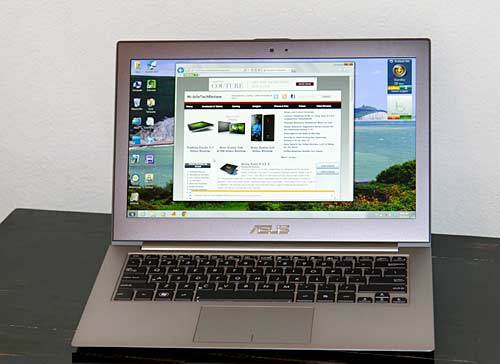
Last year's Asus Zenbook UX31E Ultrabook got top honors with reviewers and shoppers alike. It was a sleek, sexy metal notebook with higher than average resolution and strong performance. It was also one of the first Ultrabooks to hit the market, and that gave it an obvious advantage. Since then many competitors have released Ultrabooks that addressed some of the Zenbook's shortcomings. Asus is an aggressive company that listens to customers and they've not only improved on our complaints, but added a killer feature: a 1080p IPS display.

Asus Zenbook Prime UX31A

The Zenbook Prime UX31A is a 13.3" Ultrabook running on third generation Intel Ivy Bridge ULV CPUs. Asus offers it with Intel Core 1.7GHz i5 and 1.9GHz i7 dual core CPUs, Intel HD 4000 graphics, 4 gigs of RAM soldered to the motherboard and 128 or 256 gig SSDs. We take a look at the Core i5 with the 128 gig SSD for this review (model UX31A-DB51). All Zenbook Prime models have a 1080p IPS display, SSD and backlit keyboard. Yes, even the Zenbook Prime UX21A 11.6" model has a 1080p display!

Asus Zenbook Prime UX31A

Other Zenbook Prime Models
- The first generation Zenbook UX31E had a lower resolution, non-IPS display and Intel Sandy Bridge CPUs. It looks nearly identical to the UX31A.

- The Zenbook Prime UX31A is available with a 1.7GHz Intel Core i5 CPU (UX31A-DB51) or with a 1.9GHz Intel Core i7 CPU and a 256 gig SSD (UX31A-DB72). A classic Ultrabook by Intel's definition with SSD storage, Intel ULV CPUs and an extremely thin and light design.

- There are custom Best Buy and Amazon models as well. The Best Buy model is the same as the DB51 minus the 1 year accidental damage warranty. The Amazon AB71 has the Core i7 CPU and a 128 gig SSD.

- The Asus Zenbook Prime UX32VD has dedicated NVidia GT620M graphics (a lower end dedicated GPU) and both the RAM and hard drive are upgradable. The UX32VD ships with a conventional spinning 500 gig hard drive and a small SSD drive that boosts boot and resume times. 

- Lastly, the Zenbook UX32A (no "Prime" in the name) is a low spec model with a 1.4GHz Core i3 ULV CPU, 320 gig conventional hard disk and a lower resolution display (not a good pick).

* The word Prime= 1080p display, an SSD drive and a backlit keyboard.

Design and Ergonomics
The 2.86 pound UX31A Zenbook Prime is a dead ringer for the first gen Zenbook UX31E, and that's a good thing since that machine was simply stunning looking and well made. The casing is metal and extremely rigid. The combo of a dark metal swirl lid and a brushed stainless steel hinge barrel and bottom look great. The laptop looks and feels like a high quality piece of tech that holds its own against the MacBook Air. Like the Air, it tapers and is 3mm thin at the front and 9mm at the rear.

Asus Zenbook Prime UX31A

The Zenbook Prime has two USB 3.0 ports (one charging), micro HDMI, mini VGA, 3.5mm audio and an SD card slot (SD cards stick out and aren't flush with the casing). Like the last Zenbook, Asus includes a USB Ethernet adapter and VGA adapter in the box and a brown ballistic nylon slip case for the dongles and another for the laptop. 

Asus Zenbook Prime UX31A

Stereo speakers fire from the left and right edges just underneath the notebook, and volume is decent for a small machine. The tiny speaker grilles aren't positioned directly over the oval drivers inside, and I'd bet that reduces potential volume. The UX31A won't win in a battle with HP's Beats Audio notebooks, but sound is full enough that you can enjoy a few music tracks or a movie without running for the headphones or external speakers. Like the previous generation Asus Ultrabook, the UX31A has Bang & Olfusen ICEpower audio.

Despite the all metal casing, the Asus doesn't get terribly hot when doing productivity tasks. Case temps stay in the low to mi -90's Fahrenheit and the palm rest area is typically 90 degrees. When doing productivity work the fan is nearly silent, and when gaming the fan becomes audible but it doesn't roar. CPU temps are in the upper 20's Centigrade when web browsing and using MS Office (that's quite cool).

Keyboard and Trackpad
Asus has greatly improved the keyboard with much better tactile feel and key travel. Really. I spend lots of time writing and the original Zenbook keyboard annoyed me more each week. I've written 5 reviews on the Zenbook Prime keyboard and it has me smiling. It's not as tactilely delightful as the Dell XPS 13 and Lenovo ThinkPad X230 keyboards, but my typing speeds and error rates were good. The keys are backlit and you can control backlight level via Fn keys or let the ambient light sensor handle it for you. Thanks to the rigid casing, there's virtually no keyboard flex, unlike the UX32VD.

The Elan trackpad is improved as well, with more reliable tracking and multi-touch behavior, but palm rejection is weak. I installed the free utility TouchFreeze to improve palm rejection when typing. Pro tip: uninstall Asus Virtual Touch and multi-touch gestures will work much better! After Asus Live Update installed an update for Asus Smart Gesture (Asus' TouchPad driver that replaces the Elan driver), multi-touch gestures were more reliable and native palm rejection improved greatly so I didn't need TouchFreeze. Bottom line: the trackpad works, but like many Windows laptops, it falls far short of the Retina MacBook Pro and MacBook Air experience.

1080p Display

The Zenbook Prime impresses before you open the lid thanks to the elegant industrial design and sturdy feel. Open it up and the matte 1920 x 1080 IPS display seals the deal. The matte panel is simply gorgeous: very bright, lovely balanced colors and high contrast. Text is very sharp and black levels are excellent. Asus didn't skimp here. The 360 nit panel is brighter than most notebooks on the market (disable the ambient light sensor if you really want to blast your retinas). The display will likely set the Zenbook Prime ahead of the competition for some time. Since this is an IPS panel, viewing angles are very wide, and there's no need to angle the display forward and back to find the sweet spot as with TN panels. Whites are wonderfully neutral and the display looks as good as my MacBook Pro with Retina display, though Mac OS X does a better job of fine tuning fonts in Retina-aware apps. Contrast is likewise excellent with rich blacks that don't invert or look muddy.

It wouldn't be an Asus product if we didn't have some light bleed, but to be fair, light bleed in IPS displays isn't uncommon. What is light bleed? The display may have lighter spots near the edges when viewing black backgrounds like the black bars in letterboxed widescreen movies. Our unit, which came from a local retailer, has a small amount of light bleed along the bottom edge, but it's nothing we'd call annoying (watch our video review to see the display showing a pure black image in the dark). Anecdotally, the Zenbook Prime UX32VD seems more prone to light bleed according to user forums. Interestingly, our UX31A's light bleed decreased after a few days, to the point where it became hard to demonstrate for our video review. Perhaps the glue securing the display panel had finally set?

The Zenbook Prime has Intel WiFi and Intel graphics: the happy couple that's required for Intel WiDi wireless display, which is pre-installed. With WiDi and a receiver box that plugs into your home theater setup via HDMI like the Netgear Push2TV, you can stream your display's contents to your HD TV, or use your TV as a second monitor sans wires. For those who prefer wires, there's a micro HDMI 1.4 port on the right side and a 3.5mm combo headphone/mic jack. For those who use projectors and older monitors, there's a mini VGA port and Asus includes a dongle adapter that converts it to a full size VGA port. 


This is a classic Ultrabook, and that means dual core 17 watt Intel Core i5 and i7 ULV (ultra low voltage CPUs) that use less power and generate less heat than their full mobile counterparts used in standard size notebooks. That said, they're more than fast enough for everyday productivity work like web, email, MS Office and even moderate Photoshop work. 

Streaming and local HD video playback work wonderfully and that's much appreciated given the 1080p display. Ultrabooks rely on Intel HD graphics, and in the case of this third generation Intel machine, that means Intel HD 4000 graphics, which is significantly faster than the Intel HD 3000 used in Sandy Bridge models like the UX31E. That doesn't mean you can play Crysis 2 on high settings at native resolution, but casual and older 3D games play with good frame rates and even demanding current games like Skyrim play at 30 fps on low settings and a less stressful 1366 x 768 resolution. Beyond serious gaming, what else wouldn't I use an Ultrabook for? Editing 1080p video on a daily basis. It's fine in both Core i5 and i7 dual core renditions for occasional vacation footage editing, but is too slow for those who edit HD video professionally/frequently. There is no quad core i7 ULV CPU, Intel stops at dual cores.

The machine has 4 gigs of DDR3 1600MHz RAM soldered to the motherboard, so no upgrades are possible. Look to the Asus Zenbook Prime UX32VD for upgradable memory and hard drives. The Zenbook Prime UX31A is available with 128 and 256 gig SATA III SSD drives, and these are made by ADATA and Sandisk. There's no way of knowing which you'll get, since the "Sandforce" sticker that indicates the faster ADATA drive is on the inner box (the same was true with last year's UX31E). That said, the Sandisk drive is much improved over that used in the UX31E, and it no longer means a huge performance drop vs. the ADATA with a Sandforce controller. Our model from a local Microcenter had the ADATA 128 gig drive and the 1.7GHz Intel Core i5-3317U CPU.

Thanks in large part to the SSD drive, our Zenbook Prime UX31A feels very peppy, and Windows boots in well under 30 seconds. Resume from sleep takes just seconds. It scores very high on synthetic benchmarks like PCMark Vantage because of the SSD drive that's so much faster than conventional spinning hard drives, but don't let that fool you: in terms of raw processing power it's not faster than 15.6" and larger laptops with full Intel Core i5 and i7 CPUs. Though we fault PCMark for favoring SSDs so much, it does reflect the perceived performance boost they offer for core functions like launching apps and booting Windows. The machine boots and launches applications much more quickly than a quad core i7 HP Envy or Dell XPS with a conventional spinning hard drive.

Benchmarks
3D Mark Vantage: 2801 (GPU 2310, CPU 7663) on Performance test preset

PCMark Vantage: 12,272  Memories: 7336
TV and Movies: 4625
Gaming: 8920
Music: 13,620
Communications: 12,348
Productivity: 15,158
HDD: 46,609


Windows Experience Index:
Processor: 6.9
RAM: 5.9
Graphics (for Aero): 5.9
Gaming Graphics: 6.4
HDD: 7.9


Benchmark Comparison Table

PCMark Vantage
Asus Zenbook Prime UX31A (Core i5) 12,272
Asus Zenbook UX31E (core i5 Sandy Bridge) 10,021
Sony Vaio T (Core i7 ULV Ivy Bridge Ultrabook) 12,120
Lenovo ThinkPad X230 (Core i5 Ivy Bridge) 8152
Sony Vaio S 13.3 (Core i5, NVidia GT640M LE) 7575
MacBook Pro with Retina (Core i5, NVidia GT650M) 19,174

Battery Life and Networking
The Zenbook Prime UX31A has a 50 watt Lithium Ion battery that's sealed inside. Like the last Zenbook, it comes with a small charger that looks like a gloss black version of the Macbook Air charger. In our tests with WiFi active and display brightness set to 40% (which is quite bright), the UX31A averaged 6 hours on a charge, which is average for an Ultrabook and good considering the machine is pushing extra pixels.

Asus offers 4 custom power plans for performance, entertainment, quiet office and low power consumption. You can tweak these if you like, and we suggest changing the default power management for WiFi: it sets the radio to low power mode, which destroys transfer speeds. A little too power-frugal, Asus!

The UX31A has dual band Intel Advanced-N 6235 WiFi 802.11b/g/n, and range and speeds comparable to other notebooks once we adjusted that darned WiFi power setting. The metal casing didn't cause any problems with download speeds or range. The laptop has Bluetooth 4.0 as well, and 10/100 Ethernet via the included USB Ethernet adapter.


Conclusion
Do we like the Asus Zenbook Prime UX31A? Oh yes, in fact we love it. It has superb build quality, one of the most elegant and attractive designs on the market and that 1080p IPS display will spoil you. The MacBook Air's display will be a let down, and even the super color-accurate Sony Vaio Z 1080p display will seem weak for viewing angles and brightness. The much more typing-friendly backlit keyboard, fast performance and dual USB 3.0 ports seal the deal.

Price: Starting at $1,099 for the Core i5 with 128 gig SSD

Website: www.asus.com

Asus Transformer Pad Infinity TF700

There's nothing like anticipation and low inventory to hype a product. We saw that with the Asus Eee Pad Transformer Prime early this year, and now its successor, the Asus Transformer Pad Infinity TF700 is poised to start another feeding frenzy. While the Prime has its problems, the Infinity TF700 is everything the Prime should have been, and then some. 

Wireless radios work perfectly, ports and controls are more robust and the 1920 x 1200 HD display is one of the best we've seen on a mobile product. The rear f/2.2 camera with BSI sensor and 5 element lens likewise is the best tablet camera on the market. Granted, that might not say much given the state of tablet cameras, but the TF700 really does take excellent photos and 1080p video that far surpass the mediocre Transformer Prime and Asus Transformer Pad TF300 camera.


Asus Transformer Pad Infinity TF700
Specs

The tablet runs on the newer and faster 1.6GHz NVidia Tegra 3 T33 quad core CPU with 1 gig DDR3 RAM and 32 or 64 gigs of storage. It feels fast and is fast running Android OS 4.0 Ice Cream Sandwich, and we can't wait to see how much snappier it gets with Android 4.4.1 Jelly Bean and its touch of Project Butter (Asus has said the TF700 will get Jelly Bean, and knowing them, it will be sooner rather than later). 

The tablet has Wifi 802.11b/g/n, Bluetooth 3.0 and a GPS (that works). It has a front 2 megapixel video chat camera and a rear 8 megapixel camera. Ports include micro HDMI, the usual Asus proprietary charging/docking/USB port, USB host via the optional keyboard dock or Asus USB host adapter and a 3.5mm audio jack. The Infinity has a full HD Super IPS + capacitive display and a 25Wh Lithium Ion battery. The 32 gig sells for $499 and the 64 sells for $599. It's available in amethyst gray and champagne silver, similar to the Transformer Prime.

Display

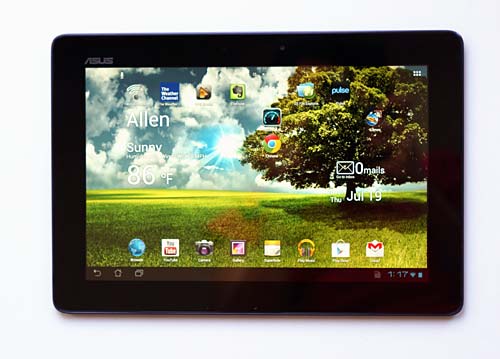
Like the new iPad with Retina display, colors are lush and detail is extreme. Images look much more real and text is superbly sharp. Unlike the iPad, the Asus Transformer Pad TF700 has one of the brightest mobile displays available. The Super IPS + display reaches over 600 nits of brightness. That certainly helps outdoor viewability, though the glossy Gorilla Glass 2 clad front reflects plenty in sunlight. 

Is the display night and day different from tablets like the Transformer Prime? Not at first glance. But you'll notice the Infinity TF700 looks more appealing and sharper, yet not as harsh as the Prime whose contrast and coolness amplify sharpness while making things look a bit hard compared to the Infinity. If you own a Prime and are happy with it, there's likely no reason to upgrade. But if this is your first tablet or you're upgrading from an older 1280 x 800 Android tablet with a non-IPS display, you'll definitely notice the improvement. The Infinity's display is sharper and brighter than the HD panel on the Acer Iconia Tab A700.

Design and Ergonomics

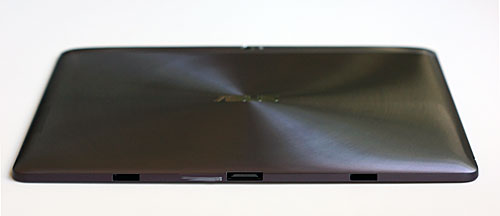
The Infinity TF700 has an aluminum back with a swirl pattern and it's available in amethyst gray and champagne gold colors. It's one of the more attractive tablets on the market, and it's also very thin at 0.39" and light at 1.32 pounds. There's a plastic strip along the back upper edge to improve wireless reception (metal interferes with reception). We've enjoyed good WiFi performance and a tenacious GPS that locks onto satellites indoors even with WiFi off.

Asus Transformer Pad Infinity TF700

As with all Transformers, you can get an optional keyboard dock that turns the tablet into a clamshell notebook style. The dock has a keyboard, trackpad, USB port and an additional battery. Asus states that the TF700 and TF201 Prime docks aren't interchangeable, but we've no problems using our Prime TF201 dock with the Infinity. The new dock has a "TF700-dock" part number on the box, but the dock is labeled TF201-dock. Go figure.

We had complaints with the Prime's port and control design. In order to make the skinny tablet seem even slimmer, Asus used an aggressive taper that's more gentle on the Infinity TF700, and the same is true of the Transformer Pad TF300.

 That makes it easier to operate the buttons without your finger sliding down the taper, and ports can be a bit more robust. The dock connector is a bit sturdier though still delicate enough that it ships with a rubber plug protecting it, and the headphone jack still leaves some of the headphone plug exposed (be careful not to short it with anything metal or you might hear feedback in your ears when using headphones). 

Unlike the Prime, the TF300 and TF700 don't ship with rubber plugs in the two holes on the bottom edge for the optional dock's latches. The holes aren't pretty but apparently users didn't take the rubber plugs out of the Prime and thus couldn't get it into the dock (really?!).
Asus Transformer Pad Infinity TF700
With the optional keyboard dock.

Thanks to its light 1.32 pound weight, the Asus Transformer Pad Infinity TF700 isn't tiring to hold, though we still think that a tablet can be too thin to hold comfortably. The Infinity TF700, like the Prime and TF300, is so skinny that there's little to hold onto. The straight sides on the Toshiba Excite 10 are actually more ergonomic.

The single speaker grille fires from the rear just where you'll likely put your hand when holding it in landscape mode. Volume and fullness are a disappointment and can't complete with the rich and loud Acer Iconia Tab A700 and Toshiba Excite 10. If the room is quiet, you can use the speakers to watch a movie, but if there's ambient noise you'll want to use headphones or portable speakers.

Performance

Asus is once again the king of tablets when it comes to processing speed. The quad core (plus fifth low power companion core) NVidia Tegra T33 CPU is the newer and slightly faster version of the T30 used on other quad core tablets and smartphones. It's clocked at 1.6GHz vs. 1.3Ghz on other tablets including the Transformer Prime and it is indeed slightly faster on benchmarks. The tablet feels very fast too, in fact it's just as fast as my quad core Nexus 7 tablet running Android 4.1 Jelly Bean, an OS that has serious speed optimizations. 

I/O storage speeds have never been top notch on Asus tablets, but in the two weeks I've been using this as my main tablet, I haven't been bothered with occasional hiccups and slowdowns as with some prior Asus models. Asus released a firmware update on July 27, 2012 that improves I/O speeds for those who are having slowdowns when using the tablet while downloading and installing large apps and files. I've installed 50 apps and haven't had performance issues with internal storage.

The TF700 has 1 gig of DDR3 RAM vs. the DDR2 RAM used on most other tablets and it's available with either 32 or 64 gigs of storage. You can augment that with microSD cards (or full size SD cards if you own the dock). We tested cards up to 32 gigs capacity and they worked fine. You can also use USB mass storage devices (USB flash drives and hard drives) that are formatted FAT32 or NTFS via Asus' small USB adapter that plugs into the sync/charge/dock port or the full size USB port on the optional keyboard dock.

As with other Transformer Android tablets, you can use power/speed settings to conserve battery power or run the tablet as fast as possible. The default Balanced setting works for us, offering nearly the same speed as Performance mode. Still, it's nice to have this geeky feature that's normally found on laptops rather than Android tablets.

Benchmarks
Quadrant GLBenchmark 2.1Egypt Offscreen AnTuTu Sunspider JavaScript Test
Asus Transformer Pad Infinity TF700 4915 74 fps 12,229 1903
Toshiba Excite 10 4143 63 fps 11,056 1935
Acer Iconia Tab A700 3646 58 fps 10,536 1958
Asus Eee Pad Transformer Prime 3801 61 fps 9846 1814
Asus Transformer Pad TF300 3425 69 fps 9559 2257

Wireless

The Transformer Infinity has single band WiFi 802.11b/g/n. Asus really worked hard to improve wireless performance compared to the Prime, and the Infinity has very good WiFi performance in terms of reception and speed. In fact, it managed -5db better signal than some of our laptops, and notebooks generally have better reception than tablets thanks to higher powered radios and longer antennas. 

The tablet has a GPS and digital compass that work well. Even with WiFi turned off, our TF700 found 8 satellites in the first floor of a two story home 15 feet from the nearest window, and it got a location fix with 8m accuracy. Nice. It took 20 seconds to get that indoor cold fix with WiFi off, and it took only a few seconds with a warm start and with WiFi on. Outdoor performance when driving was very good.

The TF700 has Bluetooth 3.0 + HS for wireless headphones, speakers and Bluetooth keyboards among other things. It worked reliably in our tests, though we did note occasional audio track delays when watching streaming videos (a common problem with single chip WiFi/Bluetooth equipped smartphones and tablets). Video didn't stutter and audio didn't sputter as a consolation.

Camera

Tablet cameras generally stink. The HTC Jetstream was an exception, but the rest didn't take photos or video that motivated us to wave a 10" camera around. The Infinity TF700 changes all that: it takes photos that are so good I don't care if I look like a dork waving it around. Images are crisp, colorful and lifelike. The camera has some trouble with extreme outdoor contrast, but it's much improved over the Prime and to be fair, many high end camera phones have problems with this. The camera has touch to focus, and autofocus times are good.

The 8 megapixel rear camera has a flash, BSI sensor and a fast f/2.2 five element lens. It shoots very sharp and smooth 1080p video at 30 fps that's good enough to capture special moments and share them with friends on-screen or over HDMI or dLNA to an HD TV. 

Battery Life

The Transformer Pad Infinity TF700 has a 25Wh Lithium Ion polymer battery that's sealed inside. Asus claims up to 10 hours use, and so far we've managed 9 on average with a mix of email, web, YouTube short clip playback and Polaris Office use. If you use the GPS heavily or game, expect shorter battery life. Video playback times are good, and we got through 3 feature length movies at 50% brightness with power to spare. The optional keyboard dock extends runtimes since it has a 19.5 Wh battery, and Asus claims 14 hours which seems on target in our tests with the TF201 dock that has a 22Wh battery. As with previous Transformer models, the battery in the dock charges the tablet and Asus includes a widget that displays both tablet and dock battery levels.

Software

The Transformer Pad Infinity TF700 ships with Android OS 4.0.3 Ice Cream Sandwich. Asus has stated that the Infinity will get the update to 4.1 Jelly Bean, and they've been good about offering OS updates reliably and quickly so we hope it won't be too long.

Asus doesn't muck much with Android's UI, so you're getting a fairly pure experience. They do add their selection of useful applications. These are the same apps that are bundled with the Transformer Prime and TF300 and they include Polaris Office (view, edit and create MS Office compatible docs), Splashtop HD remote (remotely access your PC or Mac's desktop), an app backup utility, App Locker (prevent the kids from running specified apps), SuperNote (rich notes with text and drawing support), Zinio, Press Reader, dLNA, a decently featured but slow ePub ebook reader and Asus Cloud Storage.

Conclusion

Yes! Finally a high end Asus Android tablet that we can love. My two weeks with the Asus Transformer Infinity TF700 have been truly enjoyable. The HD Super IPS + display is simply beautiful and the tablet is very fast. It's been stable as well with none of the "wait/force close" error messages that plagued my Transformer Prime and occasionally befuddled my Transformer Pad TF300. WiFi works well as does the GPS, and the camera is surprisingly super. We continue to like Asus' bundled software that truly are value-addeds rather than bloatware, and we look forward to Jelly Bean since Asus is always quick with OS upgrades.

If you're looking for a high end HD Android tablet with a versatile dock option, fast quad core CPU, USB host and an outdoor viewable display, we recommend the Transformer Pad Infinity TF700.
Price: $499 for the 32 gig and $599 for the 64 gig model

Website: www.asus.com

New iPad vs. Asus Transformer Pad Infinity TF700 Comparison

New iPad vs. Asus

The New iPad and the Asus Transformer Pad Infinity TF700, two top tablets whose price starts at $499 (though a more direct comparison is the $599 32 gig WiFi New iPad and $499 32 gig WiFi Transformer TF700) . So how do you pick, assuming you're not lucky enough to buy one of each? Both feature extremely high resolution IPS displays, elegant designs that include liberal use of aluminum and fast internals. The new iPad runs iOS 5 while the Infinity TF700 runs Android 4.0 Ice Cream Sandwich. And that's the most important differentiator: the OS and philosophy behind the respective ecosystems make for a very different experience.


No, I'm not going to say one OS is better than the other. But I will say that the New iPad and iOS are perfect for those who are techno-phobic or simply want a product that just works. What do you give up? The New iPad's UI isn't customizable beyond the wallpaper, and you're pretty much locked into iTunes and iCloud for syncing, apps and in-app content purchases. You can stream Netflix, Hulu, and as of today Amazon Instant Videos, use a wide variety of streaming radio services and load eBook apps like Kindle and Nook (though you may have to use your browser rather than the app to make new purchases).

Android is open season: in-app purchases are cool, and there are a variety of movie stores for Android (often bundled by carriers who get a cut of your purchases). You can customize the home screens and tinker with custom UIs and app launchers. You can load content via the Transformer Pad TF700's microSD card slot or use USB flash drives and hard drives (NTFS and FAT32 both supported). You'll need to buy Asus' $15 USB host adapter or the $149 keyboard dock to use USB peripherals. Apple's $29 Camera Connection Kit includes two dongles (one USB and one SD card), but the New iPad puts out very little USB power so many peripherals won't work.


As with previous Transformer vs. iPad comparisons, it's clear that the iPad is geared toward quick and easy consumption (movies, music, web browser and email) while the Transformer TF700 is more of a computer replacement with a focus on both content consumption and creation. What do you give up? Speed and stability. While my TF700 is very quick, it does occasionally slow down and need a reboot. I rarely need to reboot the iPad and it never crashes. When one company makes the OS and another makes the hardware, you lose the speed and stability that a tight platform integration offers.

With both platforms you can access cloud storage services as well. The Transfomer Pad Infinity TF700 has a micro HDMI port that mirrors the tablet's screen. Apple sells a $39 HDMI adapter and both tablets support HDMI 1.4 and HDCP. Apple has AirPlay for wireless streaming viao the $99 Apple TV, while the Transformer uses dLNA (free, but it uses a file manager style interface that's not as newbie-friendly).

Currently Asus doesn't offer a 3G/4G version of the Transformer Pad Infinity TF700. You can use your smartphone's Mobile Hotspot feature, a dedicated Mobile Hotspot device (MiFi) or WiFi for data. The iPad is available in WiFi and WiFi + 4G LTE models. Keep that in mind if you need data on the go and don't have a smartphone with Mobile Hotspot.


Display

The New iPad has a 2048 x 1536 IPS Retina display. The Asus Transformer Pad Infinity TF700 has a 1920 x 1200 Super IPS + display. Honestly, it's a tie. Both have very wide viewing angles, good color saturation, reasonably good color accuracy and super-sharp text. Both displays beat other tablets on the market. The Transformer Prime gets a point for extreme brightness, which is handy outdoors. Super IPS + mode gets you better than 600 nits of brightness to combat the sun.
Winner: Asus Transformer Pad Infinity TF700 for its super bright display.


Apps

You know the drill: the iTunes app store has more apps for tablet than the Google Play Store. While Android phone apps are catching up nicely with the iPhone, tablet optimized apps still lag. That said, the popular commercial staples are available on both platforms, from MS Office compatible suites to image editing to news consumption. Netflix, CNN, Kindle, Nook, Pulse, Facebook, Twitter, IMDB and much more.

The Android tablet gaming scene has improved greatly, and we now have a good selection of top notch games. But these games often come out for the iPad first, with a few weeks or months delay for Android (we're looking at you, Max Payne Mobile). There are more than enough tablet apps to make the Transformer Infinity TF700's experience rich, and it plays games wonderfully. But if gaming is high on your list, iOS is still the winner with a huge selection of high quality games.

Winner: New iPad


Battery Life

This is a tie; both tablets manage 9 hours of use on a charge. Both have batteries that are sealed inside. You can extend the Transformer's battery life to 14 hours with the $149 keyboard dock, which has a battery that charges the tablet.

Winner: Tie for naked tablets. Asus Transformer Pad Infinity TF700 wins when paired with the keyboard dock.


source
 
Support : Creating Website | Johny Template | Mas Template
Copyright © 2011. GADGET ONLINE - All Rights Reserved
Template Created by Creating Website Published by Mas Template
Proudly powered by Blogger